
Chevrolet Sonic Repair Manual: Driver or Passenger Seat Back Cover and Pad Replacement
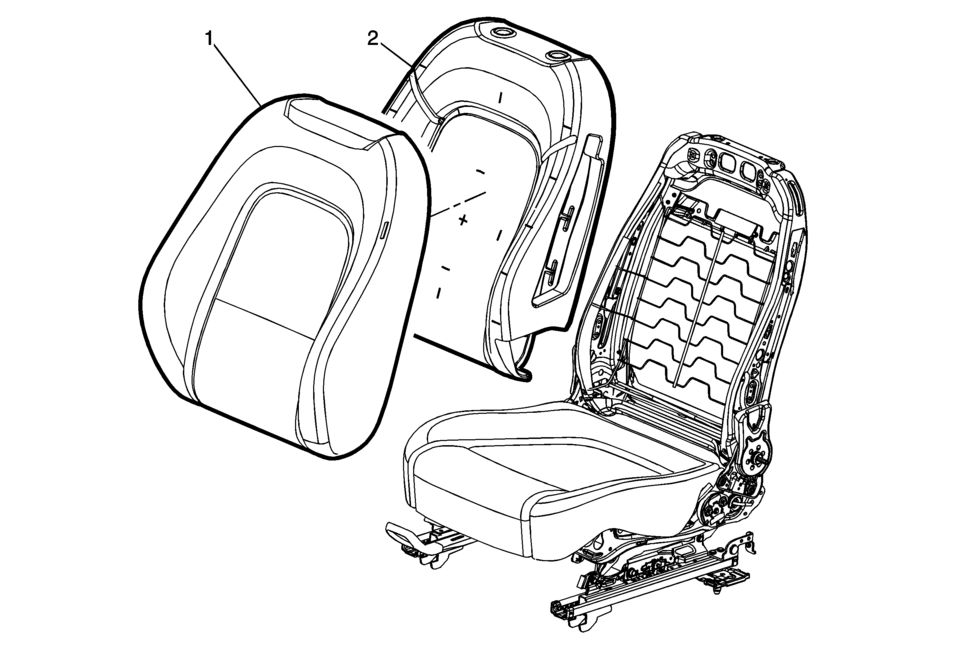
|
Callout |
Component Name |
|---|---|
|
Warning: Refer to SIR Warning. Warning: Do not repair or replace the seat stitching or seams in the seat back trim cover with an internal mounted seat side airbag module. Replace the complete seat back trim cover from the OEM. Non-OEM seat stitching may cause improper airbag deployment which could result in personal injury.
|
|
|
1 |
Seat Back Cushion Cover Procedure
|
|
2 |
Front Seat Back Cushion Pad Procedure
Pull the cushion cover assembly off of the pad. Tip: Seat back cover can be damaged upon reinstalling cover to seat back pad. When reinstalling the seat cushion cover to the seat pad, start in upper outboard corner and install outboard side of the cover. Then start at the upper inboard corner and install inboard side of cover. |
 Driver or Passenger Seat Adjuster Handle Replacement (4 Way Uplevel)
Driver or Passenger Seat Adjuster Handle Replacement
Callout
Component Name
1
Front Seat Adjuster Handle Cover
Proced ...
 Driver or Passenger Seat Back Cushion Frame Replacement
Driver or Passenger Seat Back Cushion Frame Replacement
Callout
Component Name
Preliminary Procedures
Remove the driver or passenge ...
Other materials:
Steering Wheel Controls
Some audio steering wheel controls could differ depending on the vehicle's options.
Some audio controls can be adjusted at the steering wheel.
/
(Push to Talk): For vehicles with Bluetooth
or OnStar, press to interact with those systems. See Bluetooth (Voice Recognition) or Bluet ...
Hydraulic Brake System Bleeding (Pressure)
Special Tools
CH-29532 Diaphragm Type Brake Pressure Bleeder
CH-35589-A Brake Pressure Bleeder Adapter
Warning: Refer to Brake Fluid Irritant Warning.
Caution: Refer to Brake Fluid Effects on Paint and Electrical Components
Caution.
Place a clean shop cloth beneath the b ...
Turbocharger Removal
Special Tool
EN-49942 Holding Wrench
For equivalent regional tools, refer to Special Tools.
Install the EN-49942 holding wrench (2) to the turbocharger coolant
feed pipe. Guide a ratchet wrench (1) along with an extension through EN-49942
holding wrench to the turbo ...

0.0067