
Chevrolet Sonic Repair Manual: Rear Brake Backing Plate Replacement
- Removal Procedure
-
Warning:
Refer to Brake Dust Warning.
- Raise and support the vehicle. Refer to Lifting and Jacking the Vehicle.
- Remove the tire and wheel assembly. Refer to Tire and Wheel Removal and Installation.
- Remove the rear wheel speed sensor, if equipped. Refer to Rear Wheel Speed Sensor Replacement.
- Remove the rear brake cylinder. Refer to Rear Brake Cylinder Replacement.
- Remove the brake shoes. Refer to Brake Shoe Replacement.
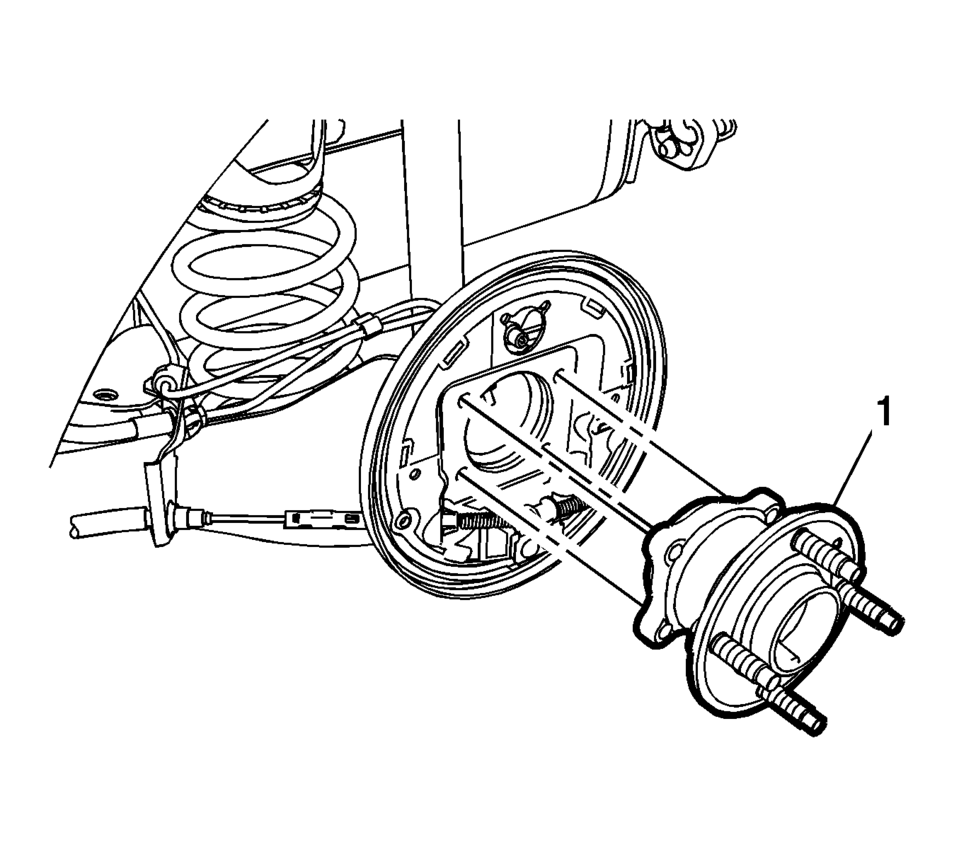
- Remove the rear wheel bearing and hub assembly (1). Refer to Rear Wheel Bearing and Hub Replacement.
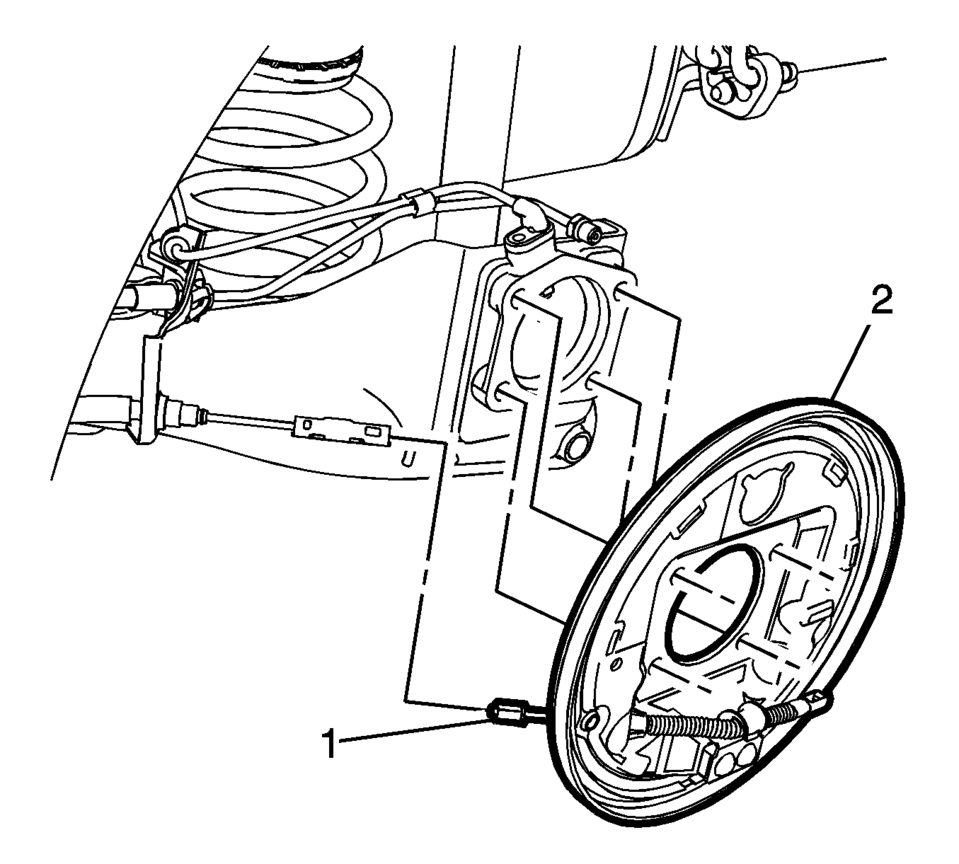
- Disconnect the front park brake cable from the park brake cable connector (1).
- Remove the rear brake backing plate (2).
- If necessary, remove the park brake cable from the rear brake backing plate by compressing the park brake cable locking tab.
Note:
The park brake cable connector is part of the cable attached to the rear brake backing plate.
- Installation Procedure
-
- If removed, install the park brake cable to the rear brake backing plate.
- Ensure the park brake cable locking tab is fully engaged in the rear brake backing plate.
- Insert the front park brake cable into the park brake cable connector (1).
- Install the rear brake backing plate (2).
- Install the rear wheel bearing and hub assembly (1). Refer to Rear Wheel Bearing and Hub Replacement.
- Install the rear wheel speed sensor, if equipped. Refer to Rear Wheel Speed Sensor Replacement.
- Install the rear brake cylinder. Refer to Rear Brake Cylinder Replacement.
- Install the brake shoes. Refer to Brake Shoe Replacement.
- Install the tire and wheel assembly. Refer to Tire and Wheel Removal and Installation.
 Parking Brake Cable Replacement (Drum Brake)
Removal Procedure
Remove the front floor console. Refer to Front Floor Console Replacement.
Ensure that the parking brake lever is in the fully released position.
Us ...
 Rear Brake Cylinder Overhaul
Disassembly Procedure
Warning: Refer to Brake Dust Warning.
Warning: Refer to Brake Fluid Irritant Warning.
Raise and support the vehicle. Refer to Lifting and J ...
Other materials:
Liftgate
To lock or unlock the liftgate from the inside, press
or
on the central locking switch or on
the driver door switch.
The vehicle must be in P (Park) for automatic transmissions. For manual transmissions
the parking brake must be engaged.
To open the liftgate from the outside, press
twi ...
Turbocharger Coolant Feed Pipe Replacement (LUV)
Turbocharger Coolant Feed Pipe Replacement
Callout
Component Name
Preliminary Procedure
Remove the turbocharger. Refer to Turbocharger Replacement.
1
Turbocharger Fastener
Caution: Refer to ...
Engine Oil Cooler Pipe Replacement (LUW)
Engine Oil Cooler Pipe Replacement
Callout
Component Name
Preliminary Procedures
Drain the cooling system. Refer to Cooling System Draining and Filling.
Remove the exhaust manifold with catalytic converter. Refer to Exhaus ...

0.1366