
Chevrolet Sonic Owner's Manual: When to Add Engine Oil
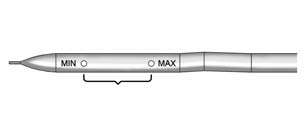
1.8L Shown, 1.4L Similar
If the oil is below the minimum mark on the dipstick, add 1 L (1 qt) of the recommended oil and then recheck the level. See “Selecting the Right Engine Oil� in this section for an explanation of what kind of oil to use. For engine oil crankcase capacity, see Capacities and Specifications.
Caution
Do not add too much oil. Oil levels above or below the acceptable operating range shown on the dipstick are harmful to the engine. If you find that you have an oil level above the operating range, i.e., the engine has so much oil that the oil level gets above the upper mark that shows the proper operating range, the engine could be damaged. You should drain out the excess oil or limit driving of the vehicle and seek a service professional to remove the excess amount of oil.
See Engine Compartment Overview for the location of the engine oil fill cap.
Add enough oil to put the level somewhere in the proper operating range. Push the dipstick all the way back in when through.
 Checking Engine Oil
It is a good idea to check the engine oil level at each fuel fill. In order to
get an accurate reading, the oil must be warm and the vehicle must be on level ground.
The engine oil dipstick handle ...
 Selecting the Right Engine Oil
Selecting the right engine oil depends on both the proper oil specification and
viscosity grade. See Recommended Fluids and Lubricants.
Specification
Use and ask for licensed engine oils with the ...
Other materials:
Air Vents
Use the air vents located in the center and on the side of the instrument panel
to direct the airflow. Move the slats on the center air vents to direct airflow.
Turn the knobs on the side air vents counterclockwise or clockwise to open or
close off the airflow.
Operation Tips
Clear away an ...
Special Tools
Illustration
Tool Number/Description
EL–50334–20
Multi-Media Interface Tester (MIT)
EL–50334–50
USB Cable and Adapter Kit
EL-48028
Digital Radio Test ...
Instrument panel
Example
The instrument panel of the Nissan Armada combines traditional controls with
advanced digital interfaces, delivering a seamless driving experience. The layout
ensures that all critical vehicle information and multimedia functions are easily
accessible to the driver.
Side venti ...

0.0092