
Chevrolet Sonic Owner's Manual: Hood
To open the hood:
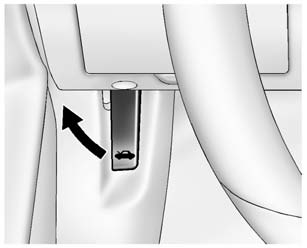
1. Pull the hood release handle inside the vehicle. It is located on the lower left side of the instrument panel.
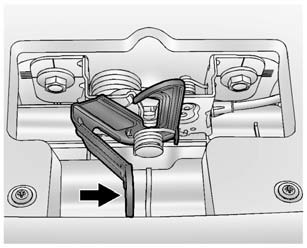
2. Go to the front of the vehicle and move the secondary hood release lever toward the right side of the vehicle.
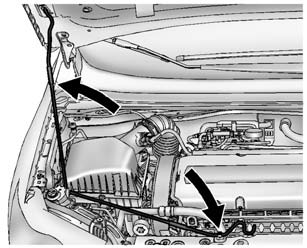
3. Lift the hood and release the hood prop from its retainer, located in front of the engine compartment. Securely place the hood prop into the slot on the underside of the hood.
To close the hood:
1. Before closing the hood, be sure all filler caps are on properly. Then, lift the hood to relieve pressure on the hood prop. Remove the hood prop from the slot in the underside of the hood and return the prop to its retainer. The prop rod must click into place when returning it to the retainer to prevent hood damage.
2. Lower the hood 30 cm (12 in) above the vehicle and release it so it fully latches. Check to make sure the hood is closed and repeat the process if necessary.
 Doing Your Own Service Work
Warning
It can be dangerous to work on your vehicle if you do not have the proper
knowledge, service manual, tools, or parts. Always follow owner manual procedures
and consult the service manual ...
 Engine Compartment Overview
1.4L L4 Engine
1. Engine Air Cleaner/Filter.
2. Engine Oil Dipstick. See Engine Oil.
3. Engine Cooling Fan (Out of View). See Cooling System.
4. Engine Oil Fill Cap. See Engine Oil.
5. Engine C ...
Other materials:
Immobilizer Light
The immobilizer light should come on briefly as the engine is started. If it
does not come on, have the vehicle serviced by your dealer. If the system is working
normally, the indicator light turns off.
If the light stays on and the engine does not start, there could be a problem
with the i ...
Front and Rear Side Door Sill Trim Plate Kit Installation
Installation Instructions Part Number
95470932
Kit Contents
elrr-lh-trim-templateelrr-rh-trim-template
Tools Required
ice18-20foam(sponge)tape2mm/5mm
Procedure
...
Trip computer
Example
Basic information
In the Nissan Armada, the trip computer is controlled using intuitive switches
located directly on the steering wheel, allowing the driver to navigate menus without
distraction.
Scroll dial - in the Nissan Armada this control enables smooth navigation
throu ...

0.0078