
Chevrolet Sonic Owner's Manual: Instrument Panel Storage
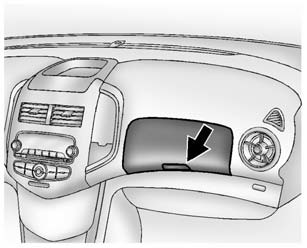
Lift up on the lever to open.
If equipped, the storage area has an auxiliary input jack and USB port inside.
 Storage Compartments
Warning
Do not store heavy or sharp objects in storage compartments. In a crash, these
objects may cause the cover to open and could result in injury. ...
 Glove Box
Lift up on the glove box lever to open it. ...
Other materials:
Body Rear Seat Back Trim Panel Replacement (with AMA/AM7)
Body Rear Seat Back Trim Panel Replacement
Callout
Component Name
Preliminary Procedure
Remove the body side trim panel. Refer to Body Side Trim Panel Replacement.
1
Body Rear Seat Back Trim Pane ...
Rear Compartment Lid Hinge Torque Rod Replacement
Rear Compartment Lid Hinge Torque Rod Replacement
Callout
Component Name
Warning: Refer to Hood Hold-Open Device Warning.
Preliminary Procedure
Open and support the rear compartment lid.
Special Tools
BO-125 ...
Wheel Alignment - Steering Wheel Angle and/or Front Toe Adjustment
Ensure that the steering wheel is set in a straight ahead position.
Loosen the tie rod jam nut (1).
Adjust the toe to specification by turning the inner tie rod (2). Refer
to Wheel Alignment Specifications.
Caution: Refer to Fastener Caution.
Tighten the t ...

0.0054