
Chevrolet Sonic Repair Manual: Radio Antenna Base Replacement
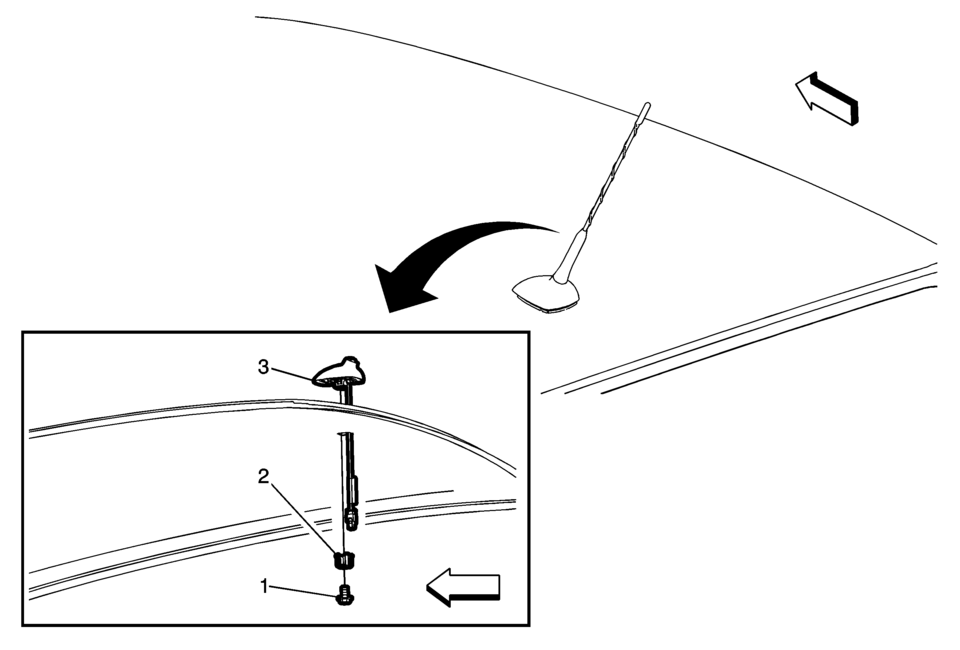
|
Callout |
Component Name |
|---|---|
|
Preliminary Procedure
Lower the rear of the headlining trim panel. Refer to Headlining Trim Panel Replacement. |
|
|
1 |
Radio Antenna Base Fastener Caution: Refer to Fastener Caution.
9 Y (80 lb in) |
|
2 |
Radio Antenna Base Retainer |
|
3 |
Radio Antenna Base Assembly Procedure
Disconnect the electrical connectors. |
 Antenna
...
 Radio Antenna Replacement
Radio Antenna Replacement
Callout
Component Name
1
Radio Antenna
Procedure
Rotate the mast counterclockwise in or ...
Other materials:
Neutral - Engine Running (Gen 2)
When the gear selector is moved to the Neutral (N) position, the hydraulic and
electrical system operation is identical to Park (P) range. However, if Neutral
is selected after the vehicle was operating in Reverse (R), the normally-low 35R
pressure control solenoid is commanded OFF and the fol ...
Control Valve Body Assembly Disassemble (Gen 2)
Control Valve Body Assembly Disassemble
Callout
Component Name
1
Control Solenoid Valve Support
2
Control Valve Body Bolt M5 x 40.5 (Qty: 1)
3
...
Intelligent Key battery replacement
WARNING
Serious hazard: Swallowing a button cell battery can result in severe
injury or death.
If a coin-type battery is swallowed, it can cause internal burns within
as little as two hours.
Always keep both new and used batteries away from children when handling
your Nissan Armada ...

0.0057