
Nissan Armada 2025-2026 Owner's Manual: Tire pressure
Tire Pressure Monitoring System (TPMS)
The Nissan Armada is equipped with an advanced Tire Pressure Monitoring System (TPMS) designed to continuously track the air pressure in all tires except the spare.
When the tire pressure drops significantly below the recommended level, the low tire pressure warning light will illuminate and a message such as "Tire Pressure Low Add Air" will appear in the Nissan Armada vehicle information display.
The TPMS system becomes active only when the Nissan Armada is driven above approximately 16 MPH (25 km/h). However, it may not immediately detect rapid pressure loss, such as a sudden puncture while driving.
Tire inflation pressure
For optimal safety and performance of your Nissan Armada, always check tire pressure regularly, including the spare, and especially before long journeys.
The correct tire pressure specifications are listed under the "Cold Tire Pressure" section on the Tire and Loading Information label located on the driver-side center pillar.
Maintaining proper tire pressure in your Nissan Armada is essential because:
- Tires naturally lose air over time.
- Pressure can drop suddenly due to road hazards such as potholes or curb impacts.
The tire pressure should always be checked when the tires are cold.
Tires are considered cold when the Nissan Armada has been parked for at least 3 hours or driven less than 1 mile (1.6 km) at moderate speed.
The TPMS with Easy Fill Tire Alert on the Nissan Armada provides visual and audible feedback outside the vehicle, helping you inflate tires accurately to the recommended pressure.
Incorrect tire pressure, especially under-inflation, can negatively impact tire lifespan, handling, and overall safety of the Nissan Armada.
WARNING
- Driving your Nissan Armada with improperly inflated tires can lead to sudden tire failure and increase the risk of accidents.
- The Gross Vehicle Weight Rating (GVWR) and load limits are specified
on the certification and Tire and Loading Information labels.
Do not exceed the maximum load capacity of your Nissan Armada, as overloading may cause premature tire wear, compromised handling, or component failure, potentially resulting in serious accidents.
- Before long trips or when carrying heavy loads, always verify tire pressures using an accurate gauge.
- Refer to official tire safety documentation for additional guidelines relevant to your Nissan Armada.
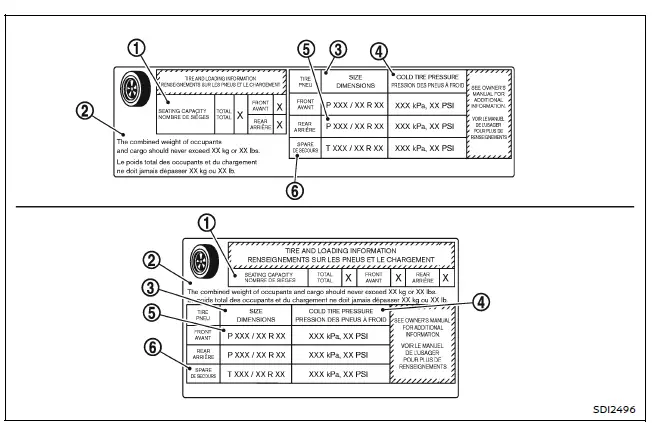
Tire and Loading Information label
- Seating capacity: Maximum number of occupants allowed in the Nissan Armada.
- Vehicle load limit.
- Original tire size installed at the factory.
- Cold tire pressure: Recommended inflation level when tires are cold, ensuring balanced performance, handling, comfort, and noise levels for the Nissan Armada.
- Tire size (refer to tire labeling section).
- Spare tire size or compact spare size (if equipped).
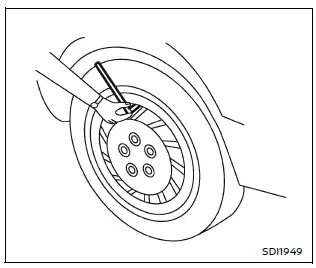
Checking the tire pressure
1. Remove the valve stem cap from the tire on your Nissan Armada.
2. Firmly press the tire pressure gauge onto the valve stem. Avoid applying excessive force or tilting the gauge, as this may cause air leakage. If a hissing sound is heard, reposition the gauge properly.
3. Remove the gauge.
4. Read the pressure value and compare it with the recommended specification shown on the Nissan Armada label.
5. Inflate or deflate the tire as necessary. If overinflated, release air by pressing the valve core briefly, then recheck the pressure.
6. Reinstall the valve stem cap securely.
7. Repeat the process for all tires, including the spare.
8. For high-speed driving conditions (where legally permitted), ensure proper tire pressure suitable for such speeds.
WARNING
- Driving at sustained high speeds (100 mph / 160 km/h or more) can generate
excessive heat in tires, increasing the risk of tire failure and loss of control
of your Nissan Armada.
Ensure that tires are rated for high-speed operation, properly maintained, and inflated to the correct pressure before such driving.
- Tire pressure must be adjusted appropriately for high-speed driving conditions.
- After high-speed operation, always return tire pressure to the recommended cold specification for your Nissan Armada.
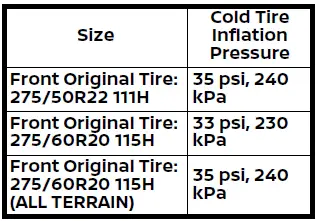
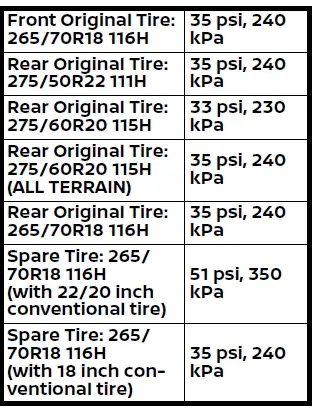
Recommended tire inflation pressures for high-speed driving conditions in the Nissan Armada are shown below.
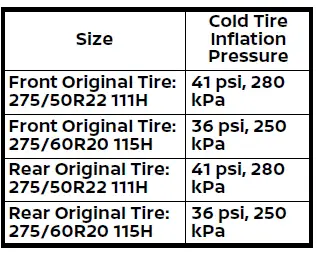
Proper tire maintenance and correct pressure management are essential for maximizing safety, fuel efficiency, tire longevity, and driving comfort in your Nissan Armada.
 Wheels and tires
...
 Tire labeling
Example
Basic information
In the Nissan Armada, all tires are required by federal regulations to display
standardized information directly on the sidewall.
This labeling provides essential da ...
Other materials:
Neutral - Engine Running (Gen 1)
When the gear selector is moved to the Neutral (N) position, the hydraulic and
electrical system operation is identical to Park (P) range. However, if Neutral
is selected after the vehicle was operating in Reverse (R), the normally-high 35R
pressure control solenoid 2 is commanded OFF and the ...
Main Shaft Assemble (Gen 2)
Special Tools
3-0207944 Main Shaft Tapered Bearing Insert Tool
For equivalent regional tools, refer to Special Tools.
Install the 4th gear bearing assembly (1).
in!i.l.i-if
Note: The 3rd gear blocking ring lugs must be aligned with the
3rd/4th gear synchronizer ass ...
Transmission Fluid Level and Condition Check
Removal Procedure
Raise and support the vehicle. Refer to
Lifting and Jacking the Vehicle
Remove the front suspension skid plate, if equipped.
Refer to Drivetrain and Front Suspension Frame Skid
Plate Replacement
Place a basin underneath the vehicle.
Clean away all ...

0.0074