
Nissan Armada 2025-2026 Owner's Manual: Vehicle Dynamic Control (VDC) OFF switch
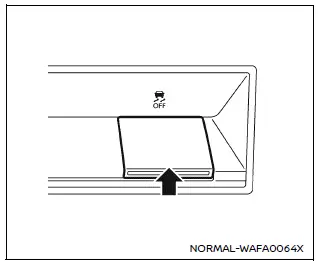
The Nissan Armada should normally be driven with the Vehicle Dynamic Control (VDC) system enabled, as it helps maintain vehicle stability and traction.
In situations such as being stuck in mud, snow, or sand, the Nissan Armada VDC system may reduce engine power to limit wheel spin. This can make it harder to free the vehicle.
If maximum engine power is required, the Nissan Armada allows you to temporarily disable the VDC system.
To turn off the VDC system, press the VDC OFF switch. The
 indicator will illuminate on the instrument panel.
To restore normal operation, press the VDC OFF switch again or restart the Nissan Armada engine.
This system plays a crucial role in maintaining control during challenging driving conditions, making it an essential safety feature of the Nissan Armada.
 Steering Assist switch
The Steering Assist switch in the Nissan Armada allows the driver to temporarily
enable or disable the Steering Assist function.
Additionally, the system can be controlled through the "Dri ...
 Hill descent control switch
WARNING
In the Nissan Armada, never rely exclusively on the hill descent control
system to regulate vehicle speed on steep downhill slopes. Always maintain full
control of the vehicle an ...
Other materials:
Fuel Tank Filler Door Replacement
Fuel Tank Filler Door Replacement
Callout
Component Name
1
Fuel Tank Filler Door
Procedure
Position the fuel tank filler door to the full open position. Using light
outward sliding pressure on the filler door, ...
Secondary Air Injection Pump Air Cleaner Pipe Replacement
Secondary Air Injection Pump Air Cleaner Pipe Replacement
Callout
Component Name
1
Hose Retainer (QTY:2)
Note: Squeeze the retainer on opposite sides to release.
2
Secondary A ...
File menu
The file menu in the Nissan Armada driving recorder system allows users to conveniently
manage all recorded content, including photos and video files. Through this interface,
you can view, organize, and delete stored media directly from the touchscreen display,
making it easy to maintain stora ...

0.005