
Chevrolet Sonic Repair Manual: Air Conditioning Compressor Bracket Removal
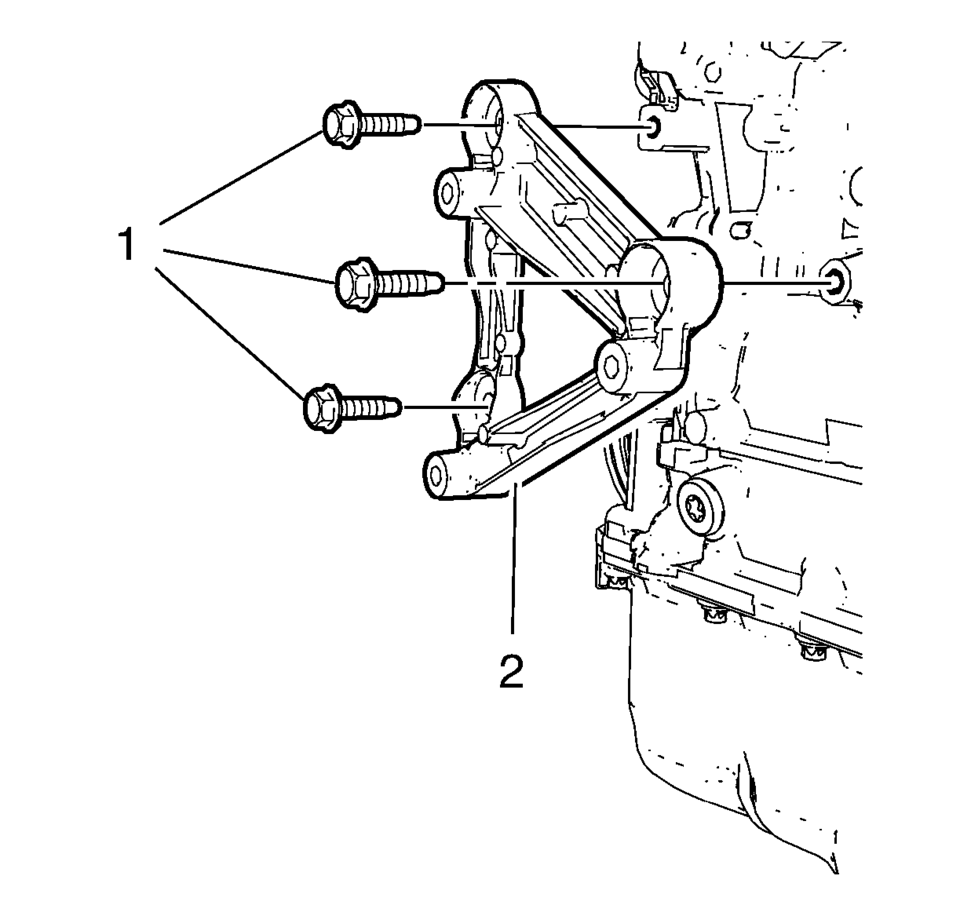
- Remove the 3 air conditioning compressor bracket bolts (1).
- Remove the air conditioning compressor bracket (2).
 Air Conditioning Compressor Bracket Installation
Install the air conditioning compressor bracket (2).
Caution: Refer to Fastener Caution.
Install the 3 air conditioning compressor bracket bolts (1) and tigh ...
 Air Conditioning Compressor Oil Balancing
Draining Procedure
Note: Drain and measure as much of the refrigerant oil as
possible from the removed compressor.
Drain the oil from both the suction and discha ...
Other materials:
Rear Compartment Floor Panel Carpet Replacement (Hatchback)
Rear Compartment Floor Panel Carpet Replacement
Callout
Component Name
1
Rear Compartment Floor Panel Carpet Assembly
...
Rear Seat Back Cushion Cover and Pad Replacement (AMA 60% w/Split Back)
Rear Seat Back Cushion Cover and Pad Replacement
Callout
Component Name
Preliminary Procedure
Remove the rear seat back cushion. Refer to Rear Seat Back Cushion
Removal and Installation
Remove the rear seat head restraint ...
System maintenance (ProPILOT Assist 2.1)
For reliable and accurate operation of the Nissan Armada ProPILOT Assist 2.1
system, it is crucial to keep the driver monitoring area clean and free from any
obstruction at all times.
Regularly inspect the camera surface and gently remove dust, fingerprints, or
any debris using a soft, cl ...

0.0049