
Chevrolet Sonic Owner's Manual: Automatic Headlamp System
When it is dark enough outside and the exterior lamp control is in the automatic position, the headlamps come on automatically. See Exterior Lamp Controls.
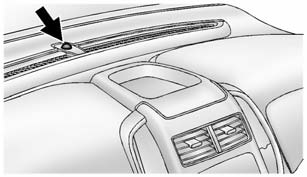
The vehicle has a light sensor on top of the instrument panel. Make sure it is not covered, or the headlamps will be on when they are not needed.
The system may also turn on the headlamps when driving through a parking garage or tunnel.
Lights On with Wipers
If the windshield wipers are activated in daylight with the engine on, and the
exterior lamp control is in AUTO, the headlamps, parking lamps, and other exterior
lamps come on. The transition time for the lamps coming on varies based on wiper
speed. When the wipers are not operating, these lamps turn off. Move the exterior
lamp control to  or
or
 to disable this feature.
 Daytime Running Lamps (DRL)
DRL can make it easier for others to see the front of your vehicle during the
day. Fully functional DRL are required on all vehicles first sold in Canada.
This indicator light turns on in the ins ...
 Hazard Warning Flashers
(Hazard Warning Flasher): Press
and momentarily hold this button to make the front and rear turn signal lamps flash
on and off. This warns others that you are having trouble. Press and momentar ...
Other materials:
Instrument Panel Assembly Replacement
Instrument Panel Assembly Replacement
Callout
Component Name
Preliminary Procedure
Remove the right and left windshield side garnish moldings. Refer
to Windshield Side Garnish Molding Replacement.
Remove the front floor c ...
Accelerator Pedal Position Sensor Replacement
Accelerator Pedal Position Sensor Replacement
Callout
Component Name
Preliminary Procedure
Disconnect the battery negative cable. Refer to
Battery Negative Cable Disconnection and Connection.
1
...
Front Floor Console Cover Replacement (Manual Transmission)
Removal Procedure
Use a flat bladed plastic trim tool in order to release
the retainers securing the console cover (1) to the console assembly.
Reach under the console cover assembly (1) and release
the retainer tabs securing the transmission s ...

0.0075