
Chevrolet Sonic Repair Manual: Automatic Transmission Flex Plate Replacement
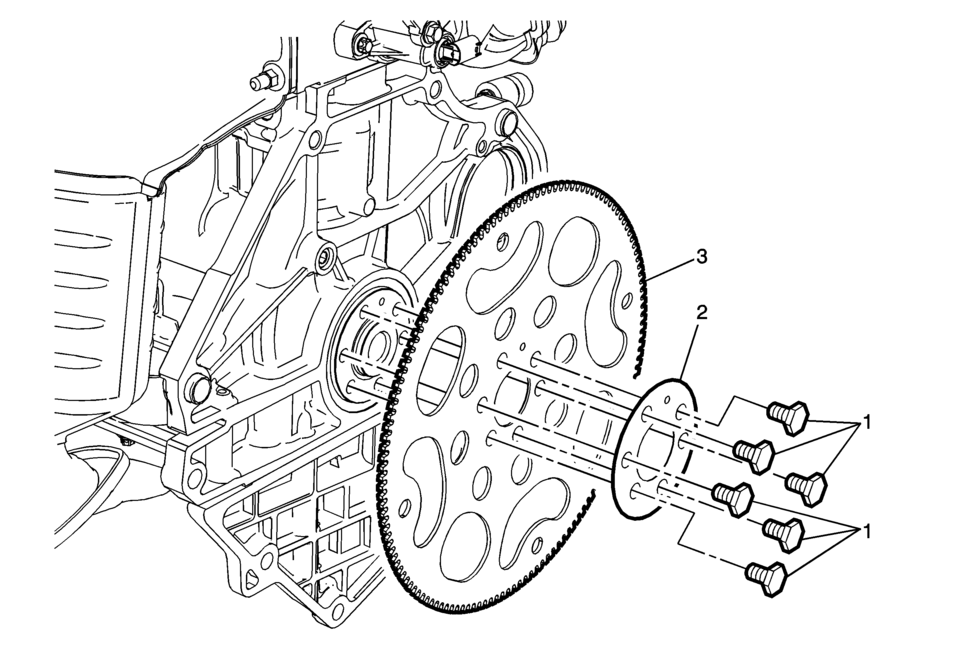
|
Callout |
Component Name |
|---|---|
|
Preliminary Procedure
Remove the transmission. Refer to Transmission Replacement. Special Tools
For equivalent regional tools, refer to Special Tools. |
|
|
1 |
Automatic Transmission Flex Plate Fastener (Qty: 6) Caution: Refer to Fastener Caution. Procedure
Ensure to use a NEW fastener whenever the automatic transmission flex plate is removed. Tighten
|
|
2 |
Flex Plate |
|
3 |
Automatic Transmission Flex Plate Procedure
Inspect the automatic transmission flex plate for the following:
|
 Automatic Transmission Flex Plate Removal
Special Tools
EN-652 Automatic Transmission Flex Plate Holder
For equivalent regional tools, refer to Special Tools.
Install the EN-652 holder (1) to hold the automatic transmiss ...
 Battery Charging
Special Tools
EL 50313 Battery Tester
For equivalent regional tools, refer to Special Tools.
Diagnostic Aids
For best results, use an automatic taper-rate battery charger with a
...
Other materials:
Automatic Transmission Flex Plate Replacement
Automatic Transmission Flex Plate Replacement
Callout
Component Name
Preliminary Procedure
Remove the transmission. Refer to Transmission Replacement.
Special Tools
EN-470-B Angular Torque Wrench
EN-49979 Crankshaf ...
Cylinder Head Replacement
Special Tools
BO-38185 Hose Clamp Pliers
EN-45059 Angle Meter
For equivalent regional tools, refer to Special Tools.
Removal Procedure
Disconnect the negative battery cable. Refer to Battery Negative Cable
Disconnection and Connection.
Relieve fuel system pressure. Re ...
Manual Shift Shaft and Seal Replacement
Special Tools
DT-45201 Cooler Line Seal Remover
DT-49101 Seal Installer
For equivalent regional tools, refer to Special Tools.
Removal Procedure
Remove the battery tray. Refer to
Battery Tray Replacement.
Remove the manual shaft and position switch assembly.
Refer ...

0.0156