
Chevrolet Sonic Repair Manual: Battery Negative Cable Disconnection and Connection
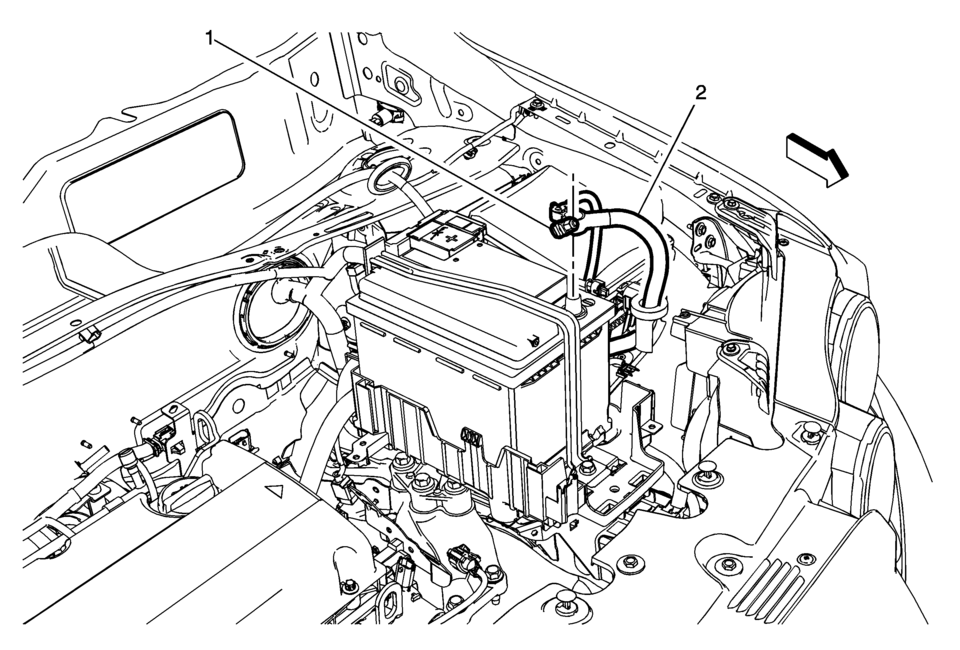
|
Callout |
Component Name |
|---|---|
Preliminary Procedures
|
|
|
1 |
Battery Negative Cable Fastener Warning: Refer to Battery Disconnect Warning. Caution: Refer to Fastener Caution.
4.5 Y (40 lb in) |
|
2 |
Battery Negative Cable Procedure
|
 Battery Inspection/Test
Diagnostic Instructions
Perform the Diagnostic System Check - Vehicle prior to using this diagnostic
procedure.
Review Strategy Based Diagnosis for an overview of the diagnostic a ...
 Battery Negative Cable Replacement
Battery Negative Cable Replacement
Callout
Component Name
Preliminary Procedures
Disconnect the battery current sensor connector.
...
Other materials:
Rear Side Door Window Regulator Motor Replacement
Rear Side Door Window Regulator Motor Replacement
Callout
Component Name
Warning: Refer to Glass and Sheet Metal Handling Warning.
Preliminary Procedure
Remove the rear side door window regulator. Refer to Rear ...
Warm Up Three-Way Catalytic Converter Installation
Install the warm up three way catalytic converter (5) to the brackets and
the turbocharger. Use a NEW warm up three way catalytic converter seal (2).
Note: Never re-use the V-clamp.
Install a NEW warm up three way catalytic converter V-clamp (1).
In ...
Engine oil
Checking engine oil level
Vehicle set-up
To ensure accurate engine oil level readings in your Nissan Armada, follow the
proper preparation steps below.
1. Park the Nissan Armada on a flat, level surface and securely apply the parking
brake.
2. Start the engine and allow it to reach no ...

0.0058