
Chevrolet Sonic Repair Manual: Communication Interface Module Bracket Replacement
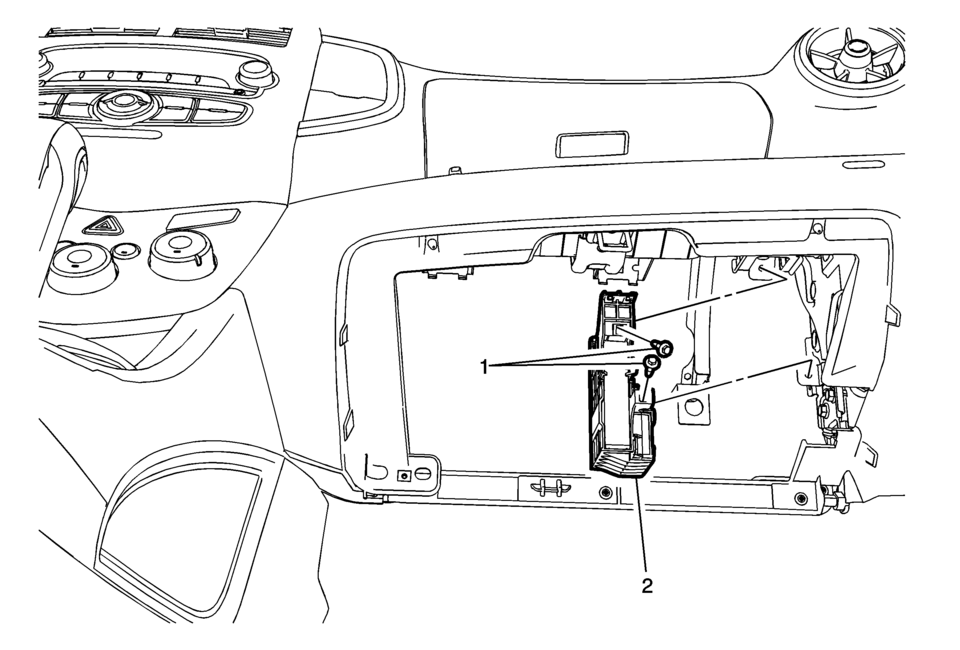
|
Callout |
Component Name |
|---|---|
|
Preliminary Procedure
Remove the instrument panel lower compartment. Refer to Instrument Panel Lower Compartment Replacement |
|
|
1 |
Communication Interface Module Bracket Bolts (Qty: 2) Caution: Refer to Fastener Caution. |
|
2 |
Communication Interface Module Bracket Procedure
|
 Communication Interface Module Battery Replacement
Communication Interface Module Battery Replacement
Callout
Component Name
Preliminary Procedure
Remove the instrument panel low ...
 Communication Interface Module Replacement
Communication Interface Module Replacement
Callout
Component Name
Preliminary Procedure
Remove the instrument panel lower compartme ...
Other materials:
Rear Bumper Fascia Outer Guide Replacement (Hatchback)
Rear Bumper Fascia Outer Guide Replacement
Callout
Component Name
Warning: Refer to Eye Protection Warning.
Preliminary Procedure
Remove the rear bumper fascia. Refer to Rear Bumper Fascia Replacement.
...
Windshield Replacement
Special Tools
BO-24402-A Glass Sealant Remover (Cold Knife)
BO-39032 Stationary Glass Removal Tool
Use an adhesive that is approved by GM
For equivalent regional tools, refer to Special Tools.
Removal Procedure
Open the hood.
Remove the windshield wiper arms. Refer to Wi ...
Transmission Case Disassemble (Gen 2)
Special Tools
3-9506289 Universal Adapter
J-810700 Mainshaft Bearing Remover
J-810704 Center Bar Puller
M-680770 Universal Sliding Mallet
R-0007758 Holding Fixture
R-0007770 Holding Fixture Adapter Plates
T-0307000 Extractor and Driver Fixture
T-9807671 Slide Hammer
For eq ...

0.0062