
Chevrolet Sonic Repair Manual: Control Valve Body Cover Installation
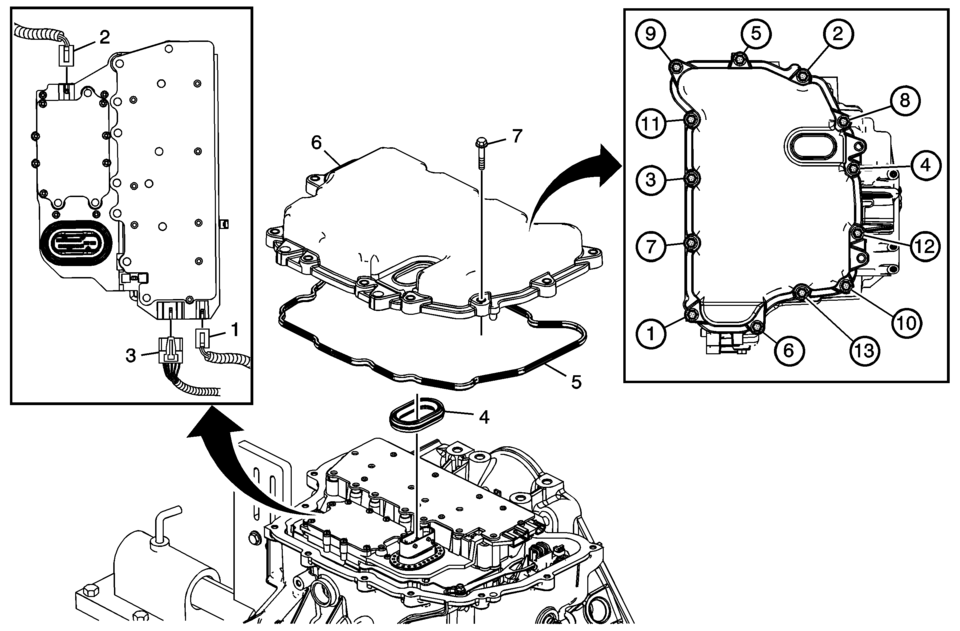
|
Callout |
Component Name |
|---|---|
|
1 |
Input Speed Sensor Connector |
|
2 |
Output Speed Sensor Connector |
|
3 |
Shift Position Switch Connector |
|
4 |
Control Valve Body Cover Wiring Connector Hole Seal Note: Do not re-use the valve body cover wiring connector hole seal. |
|
5 |
Control Valve Body Cover Gasket Note: Do not re-use the valve body cover gasket. |
|
6 |
Control Valve Body Cover |
|
7 |
Control Valve Body Cover Bolts M6 x 30 (Qty: 13) Caution: Refer to Fastener Caution.
12 Y (106 lb in) |
 Control Valve Body Cleaning and Inspection (Gen 2)
Control Valve Body Cleaning and Inspection
Callout
Component Name
Warning: Valve springs can be tightly compressed. Use care
...
 Control Valve Body Cover Replacement
Removal Procedure
Disconnect the battery negative cable. Refer to
Battery Negative Cable Disconnection and Connection.
Raise and support the vehicle. Refer to
Lifting and Jac ...
Other materials:
Engine Cover Replacement
Engine Cover Replacement
Callout
Component Name
1
Engine Cover
Procedure
Use a suitable tool to first unclip the front of the cover, then rotate
the cover backward and pull upward to remove.
...
Secondary Air Injection Pump Air Cleaner Pipe Replacement
Secondary Air Injection Pump Air Cleaner Pipe Replacement
Callout
Component Name
1
Hose Retainer (QTY:2)
Note: Squeeze the retainer on opposite sides to release.
2
Secondary A ...
Basic information
Drive Mode Selector (example)
Vehicle information display (example)
The Nissan Armada features a versatile Drive Mode Selector system that allows
the driver to tailor vehicle performance to different driving conditions. By rotating
the selector dial to the left or right, you can quickl ...

0.007