
Chevrolet Sonic Owner's Manual: Cruise Control
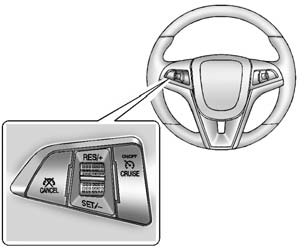
 : Press to turn the cruise control
system on and off.
RES/+: Move the thumbwheel up briefly to make the vehicle resume to a previously set speed or hold upwards to accelerate. If cruise control is already active, use to increase vehicle speed.
SET/−: Move the thumbwheel down briefly to set the speed and activate cruise control. If cruise control is already active, use to decrease speed.
 : Press to disengage cruise control
without erasing the set speed from memory.
See Cruise Control.
 Steering Wheel Controls
Some audio steering wheel controls could differ depending on the vehicle's options.
Some audio steering wheel controls can be adjusted at the steering wheel.
/
: Press to interact with the ...
 Driver Information Center (DIC)
The DIC display is in the instrument cluster. It shows the status of many vehicle
systems. The controls for the DIC are on the turn signal lever.
1. SET/CLR: Press to set or clear the menu item d ...
Other materials:
Radiator Grille Emblem/Nameplate Replacement
Radiator Grille Emblem/Nameplate Replacement
Callout
Component Name
Preliminary Procedure
Remove the front bumper fascia. Refer to Front Bumper Fascia Replacement.
Remove the front bumper energy absorber. Refer to Front Bu ...
Front Side Door Window Switch Bezel Replacement (Left Side)
Front Side Door Window Switch Bezel Replacement
Callout
Component Name
Preliminary Procedure
Remove the front side door trim. Refer to Front Side Door Trim Replacement.
1
Front Side Door Window S ...
Battery Description and Operation
Warning: Batteries produce explosive gases, contain corrosive acid,
and supply levels of electrical current high enough to cause burns. Therefore,
to reduce the risk of personal injury when working near a battery:
Always shield your eyes and avoid leaning over the battery whenever
...

0.0052