
Chevrolet Sonic Owner's Manual: Door Locks
Warning
Unlocked doors can be dangerous.
- Passengers, especially children, can easily open the doors and fall out of a moving vehicle. When a door is locked, the handle will not open it. The chance of being thrown out of the vehicle in a crash is increased if the doors are not locked. So, all passengers should wear safety belts properly and the doors should be locked whenever the vehicle is driven.
- Young children who get into unlocked vehicles may be unable to get out. A child can be overcome by extreme heat and can suffer permanent injuries or even death from heat stroke. Always lock the vehicle whenever leaving it.
- Outsiders can easily enter through an unlocked door when you slow down or stop the vehicle. Locking the doors can help prevent this from happening.
To lock or unlock the doors from outside the vehicle:
- Use the key in the driver door to lock all doors or unlock the driver door only.
- Press
 or
or
 on the Remote Keyless Entry (RKE)
transmitter. See Remote Keyless Entry (RKE) System Operation.
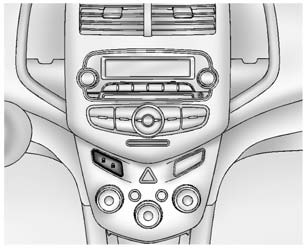
To lock the doors from inside the vehicle:
- Press on the central locking
switch or on the driver door switch. - Press the lock knob on the driver door to lock all doors and, if equipped, the liftgate.
To unlock the doors from inside the vehicle:
- Press on the central locking
switch or on the driver door switch. - Pull the door handle. Pulling the door handle again unlatches the door.
- Lift the lock knob on the driver door to unlock the driver door.
 Remote Vehicle Start
If equipped, this feature allows the engine to be started from outside the vehicle.
(Remote Vehicle Start): This button
will be on the RKE transmitter if the vehicle has remote start.
The climate ...
 Central Locking System
This system allows for the doors and liftgate/trunk to be locked and unlocked
from the RKE transmitter or the central locking switch on the center stack.
The system can be programed. See Vehicle Pe ...
Other materials:
Maintenance
Air Intake
Clear away any ice, snow, or leaves from the air intake at the base of the windshield
that can block the flow of air into the vehicle.
Passenger Compartment Air Filter
The filter removes dust, pollen, and other airborne irritants from outside air
that is pulled into the vehicle.
T ...
Rear Side Door Upper Front Auxiliary Weatherstrip Retainer Replacement
Rear Side Door Upper Front Auxiliary Weatherstrip Retainer Replacement
Callout
Component Name
1
Front Side Door Upper Front Auxiliary Weatherstrip Retainer (Qty:?€‰10)
Note: If the retainers are damaged when ...
Transmission Mount Bracket Replacement - Rear
Removal Procedure
Raise and support the vehicle. Refer to
Lifting and Jacking the Vehicle.
Remove the front suspension skid plate, if equipped.
Refer to Drivetrain and Front Suspension Frame Skid
Plate Replacement.
Using a suitable jack stand, support the rear of the ...

0.0106