
Chevrolet Sonic Repair Manual: Driver or Passenger Seat Back Cover and Pad Replacement
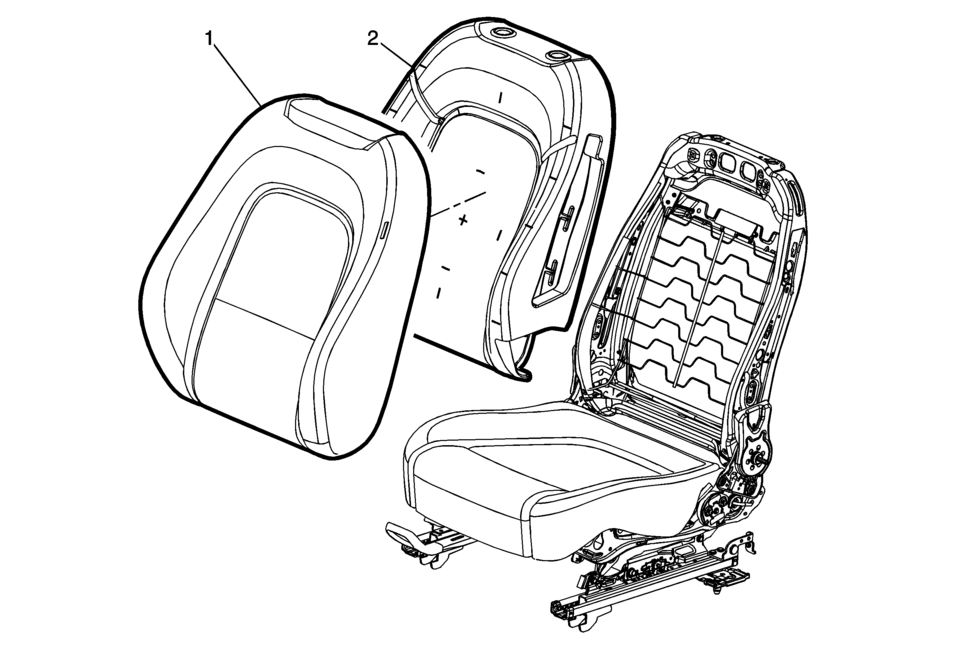
|
Callout |
Component Name |
|---|---|
|
Warning: Refer to SIR Warning. Warning: Do not repair or replace the seat stitching or seams in the seat back trim cover with an internal mounted seat side airbag module. Replace the complete seat back trim cover from the OEM. Non-OEM seat stitching may cause improper airbag deployment which could result in personal injury.
|
|
|
1 |
Seat Back Cushion Cover Procedure
|
|
2 |
Front Seat Back Cushion Pad Procedure
Pull the cushion cover assembly off of the pad. Tip: Seat back cover can be damaged upon reinstalling cover to seat back pad. When reinstalling the seat cushion cover to the seat pad, start in upper outboard corner and install outboard side of the cover. Then start at the upper inboard corner and install inboard side of cover. |
 Driver or Passenger Seat Adjuster Handle Replacement (4 Way Uplevel)
Driver or Passenger Seat Adjuster Handle Replacement
Callout
Component Name
1
Front Seat Adjuster Handle Cover
Proced ...
 Driver or Passenger Seat Back Cushion Frame Replacement
Driver or Passenger Seat Back Cushion Frame Replacement
Callout
Component Name
Preliminary Procedures
Remove the driver or passenge ...
Other materials:
Battery Inspection/Test
Diagnostic Instructions
Perform the Diagnostic System Check - Vehicle prior to using this diagnostic
procedure.
Review Strategy Based Diagnosis for an overview of the diagnostic approach.
Diagnostic Procedure Instructions provides an overview of each diagnostic
catego ...
Drive Sprocket, Driven Sprocket, and Drive Link Cleaning and Inspection
Drive Sprocket, Driven Sprocket, and Drive Link Cleaning and Inspection
Callout
Component Name
1
Drive Sprocket Thrust Washer
2
Drive Sprocket Retainer Ring
3
Drive ...
Low and Reverse and 1-2-3-4 Clutch Housing Assemble (6T40/45/50)
Table 1:
1??? Clutch Piston Installation
Table 2:
Low and Reverse Clutch Piston Installation
1??? Clutch Piston Installation
1??? Clutch Piston Installation
Callout
Component Name
...

0.0067