
Chevrolet Sonic Repair Manual: Driver or Passenger Seat Removal and Installation
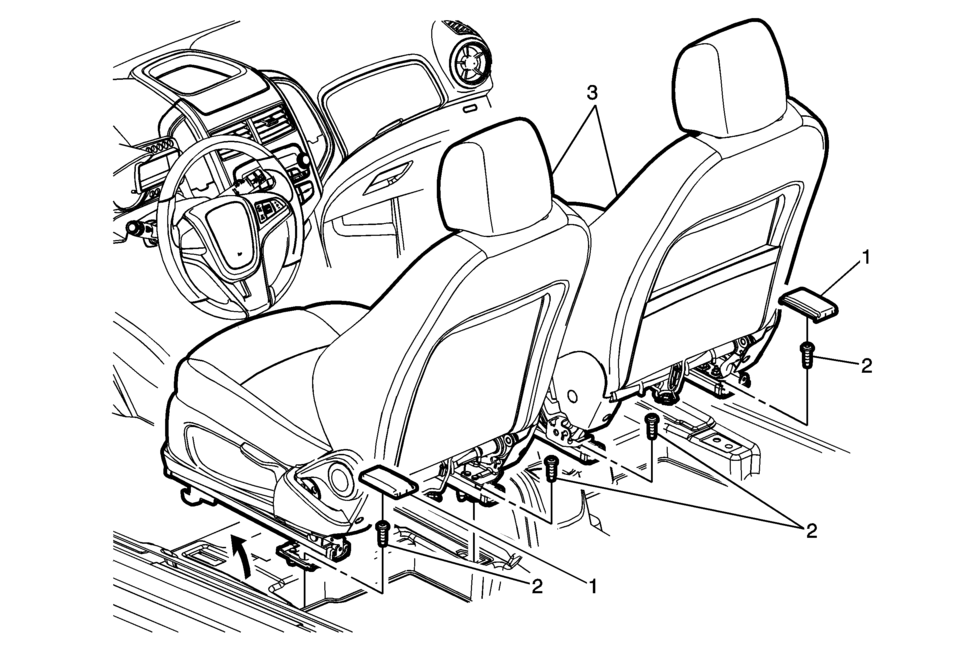
|
Callout |
Component Name |
|---|---|
|
Warning: Refer to SIR Warning.
|
|
|
1 |
Front Seat Riser Finish Cover (Qty:?€‰2) Procedure
Remove the front seat riser cover. Refer to Front Seat Riser Finish Cover Replacement. |
|
2 |
Front Seat Mounting Bolt (Qty:?€‰4) Caution: Refer to Fastener Caution. Procedure
Adjust the seat to the full forward position to gain access to the rear bolts. Tighten
40?€‰Y (30?€‰lb?€‰ft) |
|
3 |
Driver or Passenger Seat Assembly (Qty:?€‰2) Procedure
|
 Driver or Passenger Seat Head Restraint Replacement
Driver or Passenger Seat Head Restraint Replacement
Callout
Component Name
1
Driver or Passenger Seat Head Restraint
...
 Driver or Passenger Seat Shoulder Belt Replacement (with A69)
Driver or Passenger Seat Shoulder Belt Replacement
Callout
Component Name
Warning: Refer to SIR Warning.
Warning: ...
Other materials:
Rear Compartment Side Trim Replacement - Right Side (Sedan)
Rear Compartment Side Trim Replacement - Right Side
Callout
Component Name
Preliminary Procedures
Remove the rear compartment floor panel carpet. Refer to Rear Compartment
Floor Panel Carpet Replacement.
Remove the rear c ...
Rear Wiper/Washer System Description and Operation
The rear window wiper motor is located inside the hatchback door and is directly
connected to the rear window wiper. Ignition voltage is supplied to the rear wiper
motor through the wiper switch. The hatchback rear window washer systems equipped
with a separate washer fluid pump, hose, and noz ...
Special Tools
Illustration
Tool Number/ Description
BO-38185
J-38185
Hose Clamp Pliers
BO-42220
J-42220
Universal 12V Leak Detection Lamp
CH-37872
GE-30206952
3-02 ...

0.0082