
Chevrolet Sonic Repair Manual: Engine Front Cover and Oil Pump Removal
- Set engine to TDC. Refer to Camshaft Timing Chain Inspection.
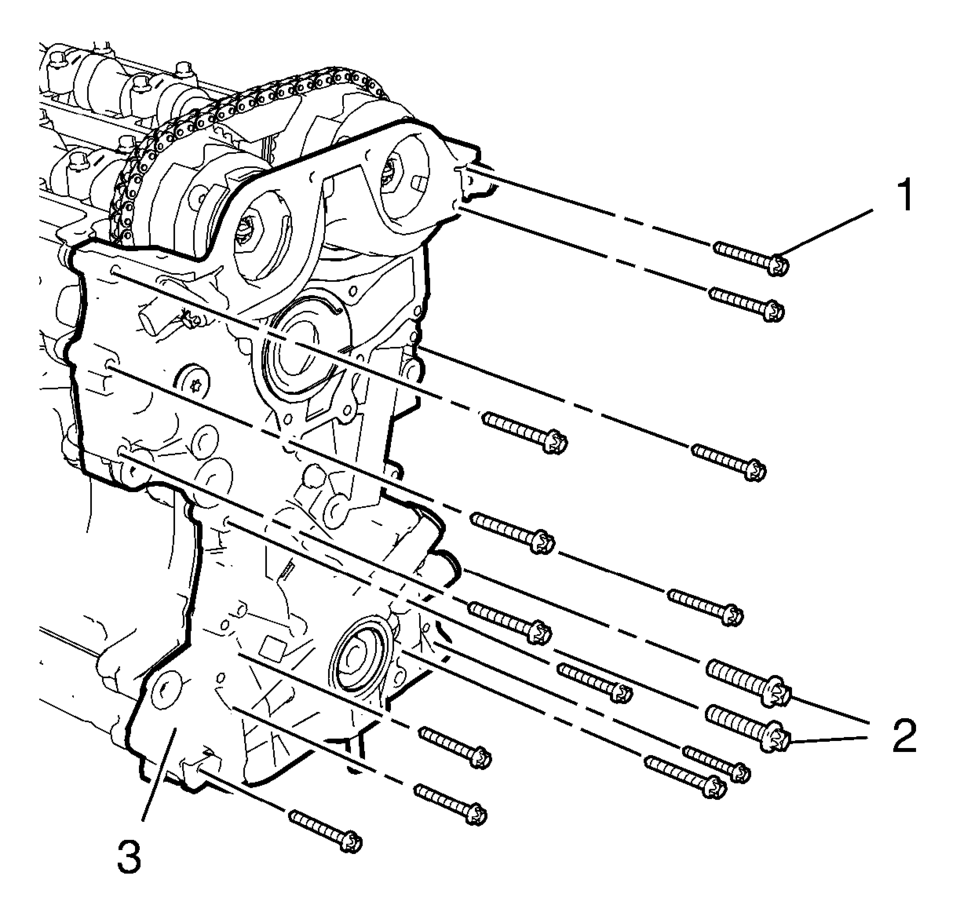
- Remove the 13 engine front cover bolts M6 (1).
- Remove the 2 engine front cover bolts M10 (2).
- Remove the engine front cover.
 Engine Front Cover and Oil Pump Installation
Special Tools
EN-952 Fixing Pin
EN-953-A Fixing Tool
EN-49977-100 Transmitter Disc Fixation
EN-49977-200 Fixing Tool
For equivalent regional tools, refer to Special Tools.
...
 Engine Front Cover with Oil Pump Replacement
Removal Procedure
Disconnect the battery negative cable. Refer to Battery Negative Cable
Disconnection and Connection.
Set the engine to TDC. Refer to Camshaft Timing Chain Inspec ...
Other materials:
Odor Correction
Eliminating Air Conditioning Odor
Odors may be emitted from the air conditioning system primarily at start
up in hot, humid climates. The following conditions may cause the odor:
Debris is present in the HVAC module.
Microbial growth on the evaporator core
When the blower ...
Throttle Body Heater Outlet Hose Replacement (LUW)
Throttle Body Heater Outlet Hose Replacement
Callout
Component Name
Preliminary Procedure
Drain the cooling system. Refer to Cooling System Draining and Filling.
Remove the air cleaner outlet duct. Refer to Air Cleaner Out ...
Exhaust Heat Shield Replacement
Exhaust Heat Shield Replacement
Callout
Component Name
Preliminary Procedure
Disconnect the exhaust system hangers and allow the exhaust system to
rest on the rear axle.
1
Exhaust Heat Shield Fa ...

0.0058