
Chevrolet Sonic Repair Manual: Front Floor Console Bracket Replacement
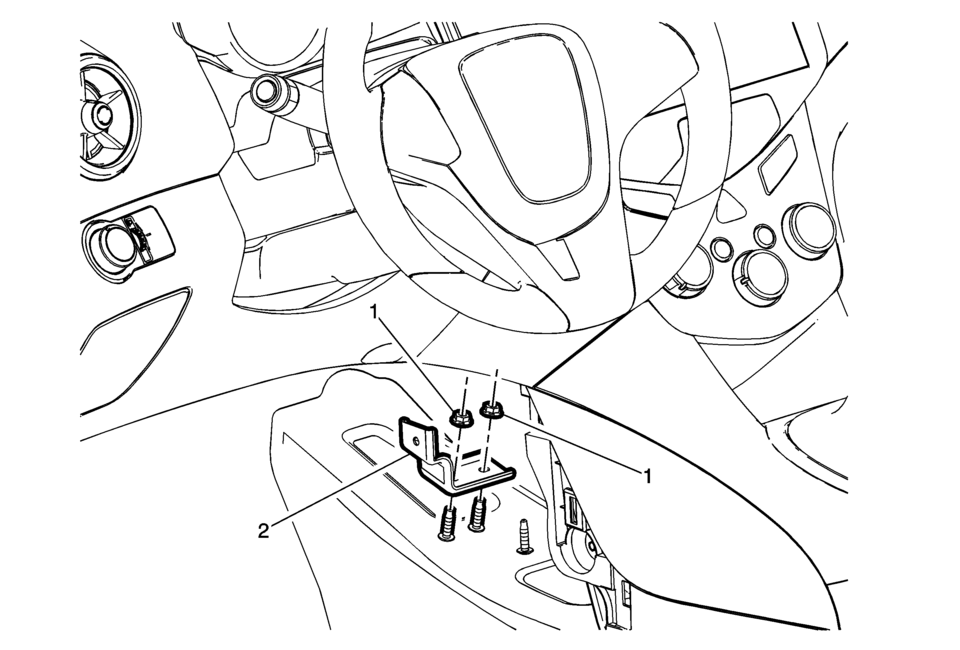
|
Callout |
Component Name |
|---|---|
|
Preliminary Procedure
Remove the left front floor console extension panel. Refer to Front Floor Console Extension Replacement - Left Side. |
|
|
1 |
Front Floor Console Extension Nuts (Qty:?€‰2) Caution: Refer to Fastener Caution. 9?€‰Y (80?€‰lb?€‰in) |
|
2 |
Front Floor Console Bracket |
 Automatic Transmission Control Indicator Opening Cover Replacement
Automatic Transmission Control Indicator Opening Cover Replacement
Callout
Component Name
Preliminary Procedure
Remove the fron ...
 Front Floor Console Cover Replacement (Automatic Transmission)
Front Floor Console Cover Replacement
Callout
Component Name
1
Front Floor Console Cover Assembly
Procedures
Appl ...
Other materials:
Hood Side Seal Replacement
Hood Side Seal Replacement
Callout
Component Name
1
Hood Side Seal Push-In Retainer (Qty:?€‰6)
2
Hood Side Seal
...
Air Conditioning Compressor and Condenser Hose Replacement (LUV)
Removal Procedure
Recover the refrigerant. Refer to Refrigerant Recovery and Recharging.
Remove the drivetrain and front suspension frame skid plate if equipped.
Refer to Drivetrain and Front Suspension Frame Skid Plate Replacement.
Remove the front fascia assembly. Re ...
Intake Camshaft Replacement
Removal Procedure
Remove the camshaft intake and exhaust sprocket. Refer to Camshaft Intake
and Exhaust Sprocket Replacement.
Remove the camshaft bearing cap bolts in sequence shown. Ensure to remove
the bolts one turn at a time until there is no spring tension p ...

0.0048