
Chevrolet Sonic Repair Manual: Front Floor Console Cup Holder Replacement
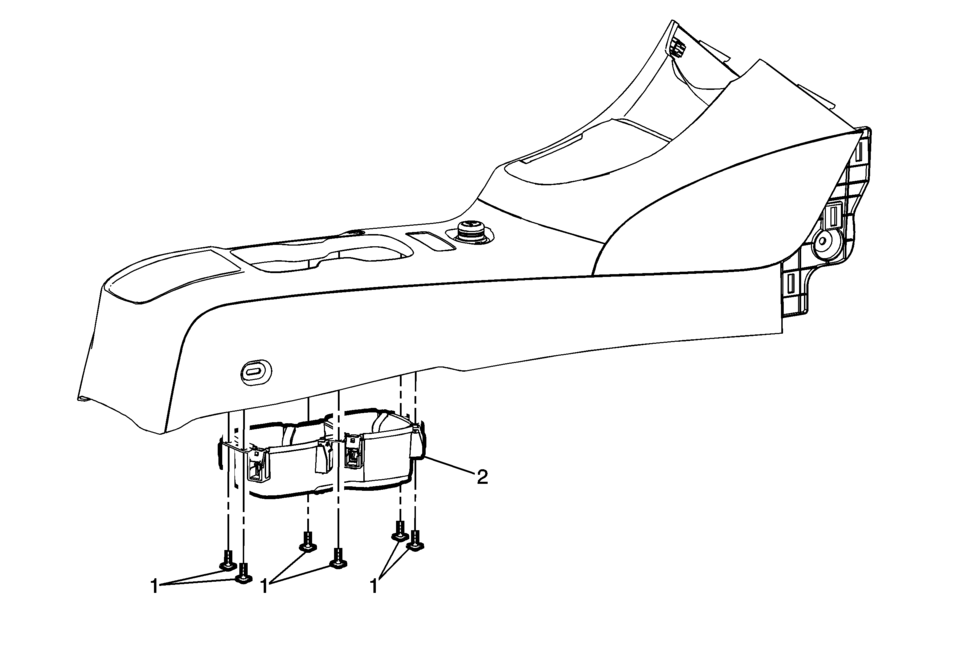
|
Callout |
Component Name |
|---|---|
|
Preliminary Procedure
Remove the front floor console assembly. Refer to Front Floor Console Replacement. |
|
|
1 |
Front Floor Console Cup Holder Fasteners (Qty:?€‰6) Caution: Refer to Fastener Caution. |
|
2 |
Front Floor Console Cup Holder Assembly |
 Front Floor Console Cover Replacement (Manual Transmission)
Removal Procedure
Use a flat bladed plastic trim tool in order to release the retainers
securing the console cover?€‰(1) to the console assembly.
Reach under t ...
 Front Floor Console Extension Replacement - Left Side
Front Floor Console Extension Replacement - Left Side
Callout
Component Name
1
Front Floor Console Extension Push-In Ret ...
Other materials:
Brake Assist
This vehicle has a brake assist feature designed to assist the driver in stopping
or decreasing vehicle speed in emergency driving conditions. This feature automatically
uses the stability system hydraulic brake control module to supplement the power
brake system under conditions where the dri ...
Replacement Bulbs
Exterior Lamp
Bulb Number
Back-Up Lamp
921
Front Fog Lamp
H8
Front Parking/Turn Signal Lamp
7444NA
High-Beam Headlamp
9005LL
...
Rear Compartment Sill Trim Plate Replacement
Rear Compartment Sill Trim Plate Replacement
Callout
Component Name
Preliminary Procedure
Partially remove the rear compartment opening weatherstrip. Refer to
Rear Compartment Lid Weatherstrip Replacement.
...

0.0086