
Chevrolet Sonic Repair Manual: Front Seat Cushion Cover and Pad Replacement
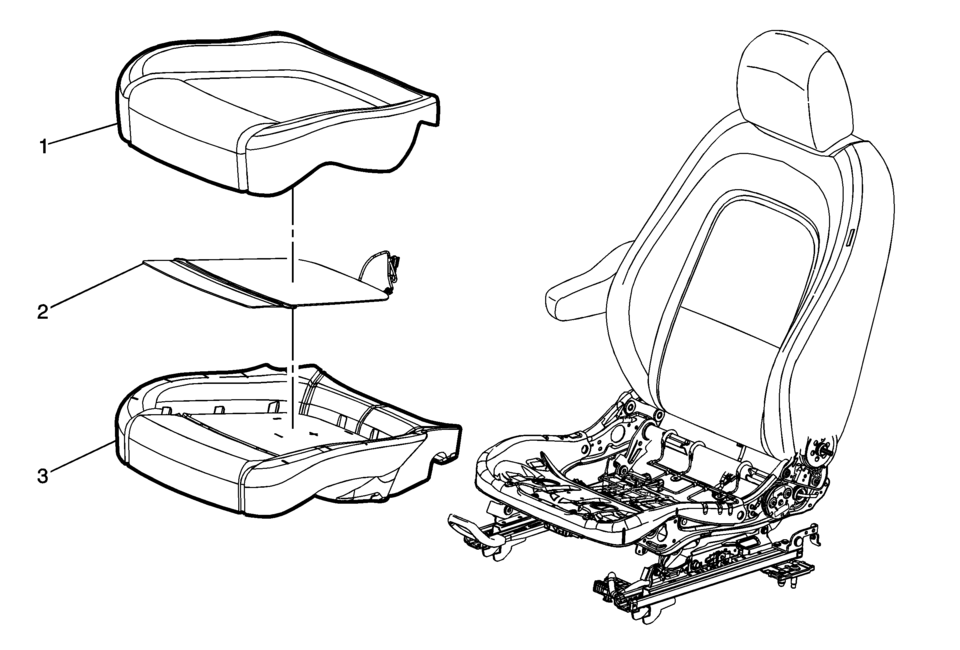
|
Callout |
Component Name |
|---|---|
|
Warning: Refer to SIR Warning.
|
|
|
1 |
Front Seat Cushion Cover Procedure
|
|
2 |
Front Seat Cushion Heater Procedure
Remove the driver or passenger seat cushion heater, if equipped. Refer to Driver or Passenger Seat Cushion Heater Replacement |
|
3 |
Front Seat Cushion Pad Note: The seat belt presence sensor and heat mat, if equipped are integral parts of the seat cushion pad. |
 Front Seat Back Recliner Handle Replacement
Front Seat Back Recliner Handle Replacement
Callout
Component Name
1
Front Seat Recliner Handle Cover Cap
Procedure
...
 Front Seat Cushion Inner Trim Panel Replacement
Front Seat Cushion Inner Trim Panel Replacement
Callout
Component Name
1
Driver or Passenger Seat Inner Recliner Finish ...
Other materials:
Rear Brake Cylinder Overhaul
Disassembly Procedure
Warning: Refer to Brake Dust Warning.
Warning: Refer to Brake Fluid Irritant Warning.
Raise and support the vehicle. Refer to Lifting and Jacking the Vehicle.
Remove the rear brake cylinder. Refer to Rear Brake Cylinder Replacement. ...
Throttle Body Inspection and Cleaning
Note: Over extended time and mileage, deposits may accumulate on the
back of the throttle valve plate. The source of the deposit is exhaust gas.
Typically these deposits pose no problem. Occasionally the deposit may accumulate
to a point where perceived pedal effort or throttle valve mov ...
Flat towing your vehicle
Flat towing
Flat towing—also referred to as dinghy towing or “4-down� towing—means towing
your Nissan Armada with all four wheels in contact with the ground.
This method is commonly used when a vehicle is towed behind a motorhome or recreational
vehicle. However, it is critical to unde ...

0.0053