
Chevrolet Sonic Repair Manual: Front Side Door Check Link Replacement
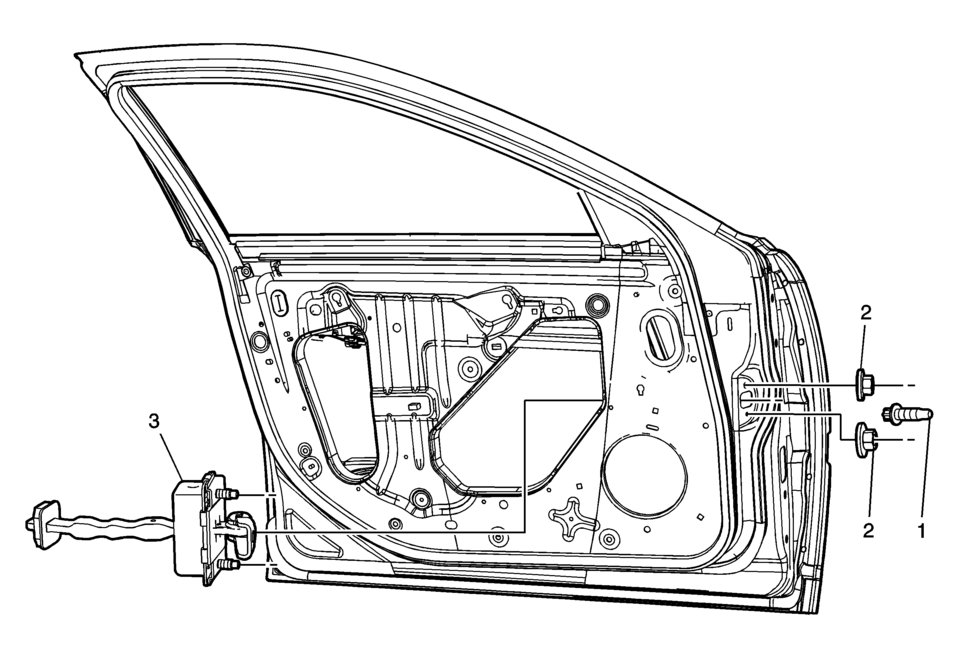
|
Callout |
Component Name |
|---|---|
|
Preliminary Procedure
Remove the front side door trim panel. Refer to Front Side Door Trim Replacement. |
|
|
1 |
Front Side Door Check Link Bolt to Body Caution: Refer to Fastener Caution. Note: Place the door window in the full open position.
22?€‰Y (16?€‰lb?€‰ft) |
|
2 |
Front Side Door Check Link Nut (Qty:?€‰2) Procedure
Remove the water deflector. Tighten
5.5?€‰Y (49?€‰lb?€‰in) |
|
3 |
Front Side Door Check Link |
 Front Side Door Adjustment
Front Side Door Adjustment
Callout
Component Name
Preliminary Procedure
Remove the front wheelhouse liner. Refer to Front Wheel ...
 Front Side Door Lock Cylinder Coding (Free Wheeling)
Special Tools
BO-49753 Assembly Tool
The door lock cylinder uses 8 of the 8?€‰cut positions. The tumbler positions
are staggered from side to side, 4 on one side and 4 on the other, are ...
Other materials:
Remote Keyless Entry (RKE) System
The RKE transmitter may work up to 60m (195 ft) away from the vehicle.
The RKE transmitter can have one of the two symbols for the remote trunk release.
With Remote Start Shown
Press the key release button to extend the key blade. The key can be used for
the ignition and all locks.
Press ...
Battery Negative Cable Replacement
Battery Negative Cable Replacement
Callout
Component Name
Preliminary Procedures
Disconnect the battery current sensor connector.
Remove the battery tray. Refer to Battery Tray Replacement.
1
Bo ...
Air Conditioning Compressor and Condenser Hose Replacement (LDE/LWE)
Removal Procedure
Recover the refrigerant. Refer to Refrigerant Recovery and Recharging.
Disconnect the A/C refrigerant pressure sensor electrical connector.
Remove air conditioning compressor and condenser hose nut (1).
Remove air conditioning compressor and ...

0.008