
Chevrolet Sonic Repair Manual: Front Side Door Check Link Replacement
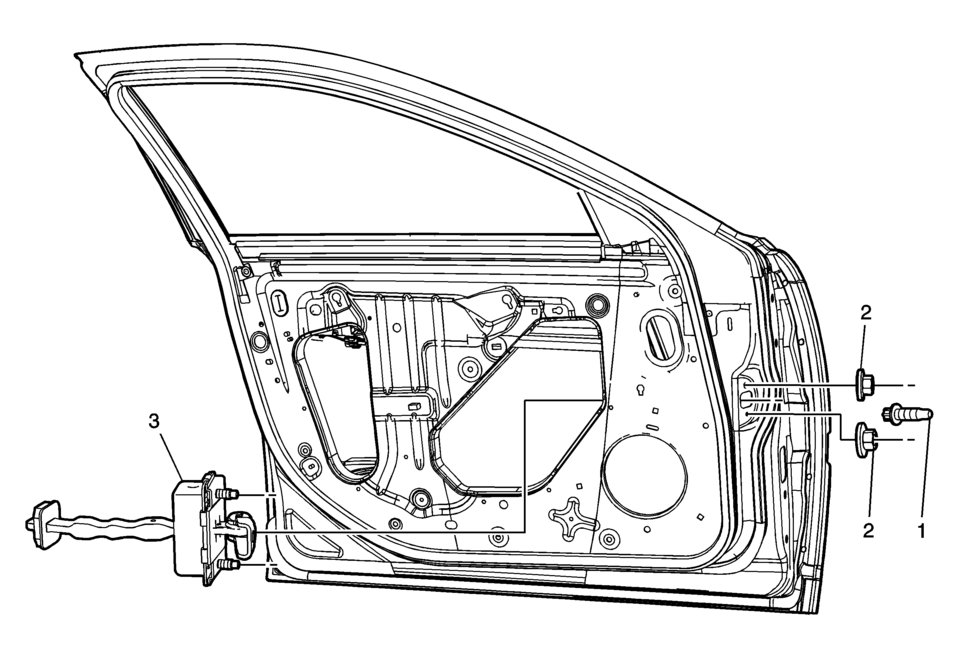
|
Callout |
Component Name |
|---|---|
|
Preliminary Procedure
Remove the front side door trim panel. Refer to Front Side Door Trim Replacement. |
|
|
1 |
Front Side Door Check Link Bolt to Body Caution: Refer to Fastener Caution. Note: Place the door window in the full open position.
22?€‰Y (16?€‰lb?€‰ft) |
|
2 |
Front Side Door Check Link Nut (Qty:?€‰2) Procedure
Remove the water deflector. Tighten
5.5?€‰Y (49?€‰lb?€‰in) |
|
3 |
Front Side Door Check Link |
 Front Side Door Adjustment
Front Side Door Adjustment
Callout
Component Name
Preliminary Procedure
Remove the front wheelhouse liner. Refer to Front Wheel ...
 Front Side Door Replacement
Front Side Door Replacement
Callout
Component Name
Warning: Refer to SIR Warning.
Preliminary Procedures
Mark the ...
Other materials:
Dimensions - Body (5HB)
Point-to-point measurements are for reference only. All measurements are given
in millimeters. Use these measurements for diagnosing and estimating. Point-to-point
measurements are duplicated with tram bar pointers set at equal lengths. All die
marks, holes, slots, and fasteners are measured t ...
How to Identify Plastic Parts
saepvcsae
Plastic parts can be identified by the SAE code, which is usually found on the
rear of the part, and/or by the characteristics of the plastic. Knowing the type
of plastic aids in selecting the proper repair materials and in selecting the proper
repair procedure.
Look for the SAE ...
Clutch System Description and Operation
Clutch Spin Down Time
Inspect the clutch spin down time as follows:
Apply the parking brake and block the vehicle wheels.
Shift the manual transmission into NEUTRAL.
Start the engine. Run the engine at idle speed.
Engage the clutch.
Disengage the clutch. Wait 9 seconds.
...

0.0068