
Chevrolet Sonic Repair Manual: Front Wheel Drive Intermediate Shaft Replacement
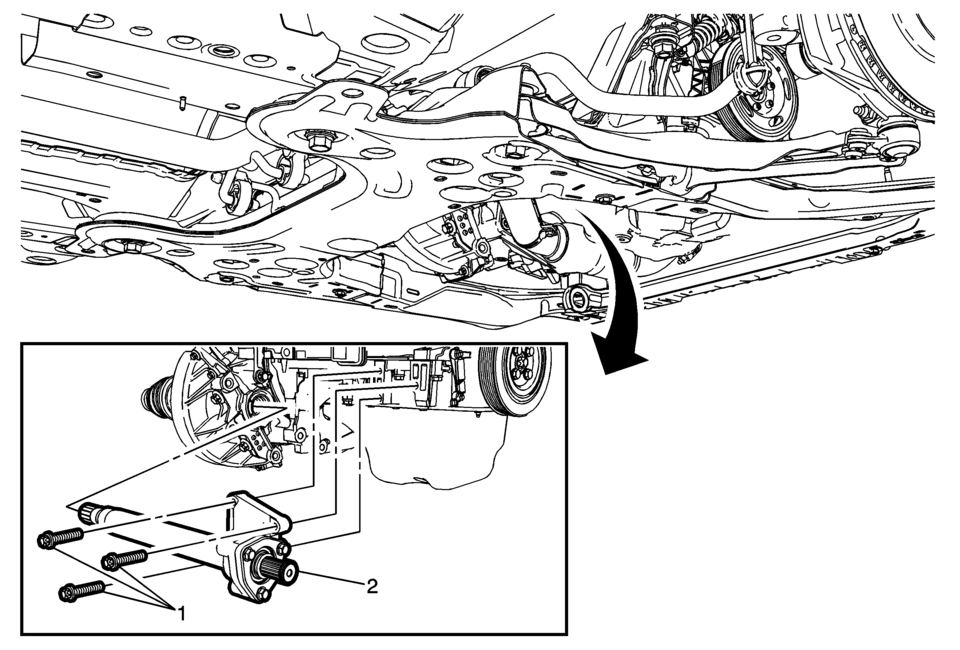
|
Callout |
Component Name |
|---|---|
Preliminary Procedure
|
|
|
1 |
Front Wheel Drive Intermediate Shaft Bracket Bolt (Qty: 3) Caution: Refer to Fastener Caution.
22 Y (16 lb ft) |
|
2 |
Front Wheel Drive Intermediate Shaft Procedure
Check the transmission fluid level and fill to the proper level, if needed. Refer to Transmission Fluid Level and Condition Check. |
 Front Camber Adjustment
Note: DO NOT grind the front strut bores for the bolts to allow
adjustment of the front camber. There are service bolts available to allow
the front camber to be adjusted, if need ...
 Front Wheel Drive Shaft Inner Joint and Boot Replacement
Special Tools
DT-35910 Drive Axle Boot Clamp Pliers
For equivalent regional tools, refer to Special Tools.
Disassemble Procedure
Note: There are types of inner joints available. If ...
Other materials:
Home Page (Radio with Touchscreen)
Touchscreen Buttons
Touchscreen buttons show on the screen when available. When a function is
unavailable, the button may gray out. When a function is selected, the button
may highlight.
Home Page Features
audiopicturemovietelephoneelsmartphonelinksettings03/06/2012
...
Rear Bumper Impact Bar Replacement (Sedan)
Rear Bumper Impact Bar Replacement
Callout
Component Name
Preliminary Procedure
Remove the rear bumper fascia. Refer to Rear Bumper Fascia Replacement.
1
Rear Bumper Impact Bar Bolt (Qty:?€‰4 ...
Floor Air Outlet Duct Replacement - Right Side (LHD)
//
Floor Air Outlet Duct Replacement - Right Side
Callout
Component Name
Preliminary Procedure
Remove the instrument panel insulator, if equipped.
1
Floor Air Outlet Duct Fastener
2
...

0.0063