
Chevrolet Sonic Repair Manual: Gear Position Sensor Replacement
|
Callout |
Component Name |
|---|---|
|
Preliminary Procedure
Unclip the engine control module (ECM) and bracket from the battery tray. |
|
|
1 |
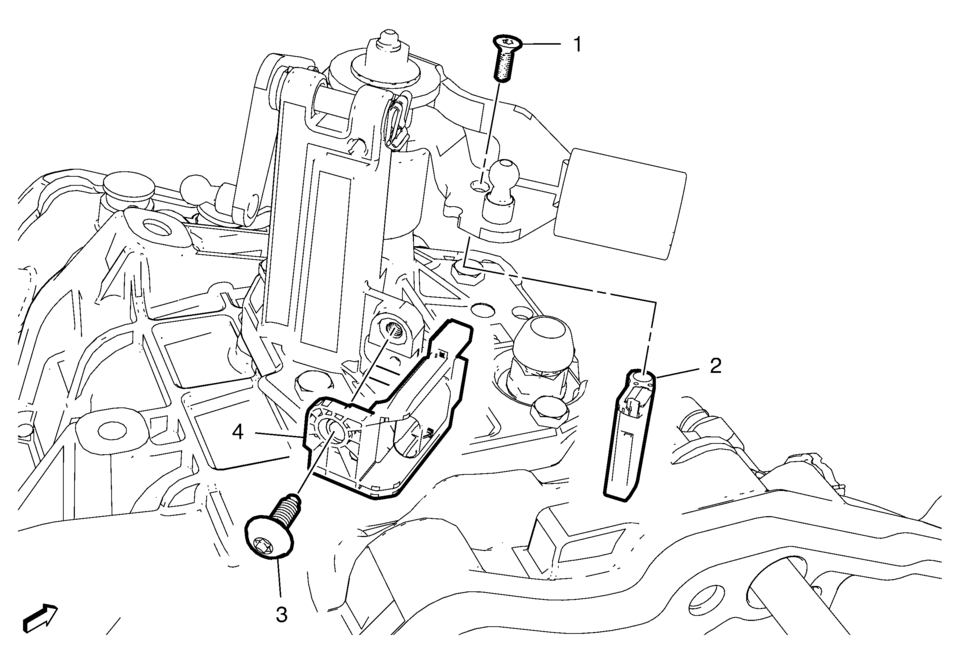
Gear Position Sensor Magnet Bolt Caution: Refer to Fastener Caution.
8 Y (71 lb ft) |
|
2 |
Gear Position Sensor Magnet |
|
3 |
Gear Position Sensor Bolt Tighten
8 Y (71 lb ft) |
|
4 |
Gear Position Sensor Procedure
|
 Front Wheel Drive Shaft Seal Replacement - Right Side
Callout
Component Name
Preliminary Procedures
Raise and support the vehicle. ...
 Gears Cleaning and Inspection (Gen 1)
Gears
Warning: Wear safety glasses to avoid injury when using compressed
air or any cleaning solvent. Bodily injury may occur if fumes are inhaled
or if skin is exp ...
Other materials:
Instrument Panel Center Molding Replacement (With U58)
Instrument Panel Center Molding Replacement
Callout
Component Name
1
Instrument Panel Center Molding Assembly
Procedure
Use a flat bladed plastic trim tool in the shown locations, then
rotate the trim tool 90 ...
Transmission Mount Replacement - Left Side
Removal Procedure
Remove the battery tray. Refer to
Battery Tray Replacement.
Install the engine support fixture. Refer to
Engine Support Fixture.
Remove and DISCARD the left transmission mount to
bracket bolts (1).
Remove the left transmission mo ...
How to use the HUD
Basic information
To activate the Head Up Display in the Nissan Armada, press the HUD switch. Press
it again to turn the system off.
If the HUD is turned off, it will remain disabled even after restarting the Nissan
Armada, maintaining the last selected setting.
The following HUD settings ...

0.0068