
Chevrolet Sonic Repair Manual: Generator Installation
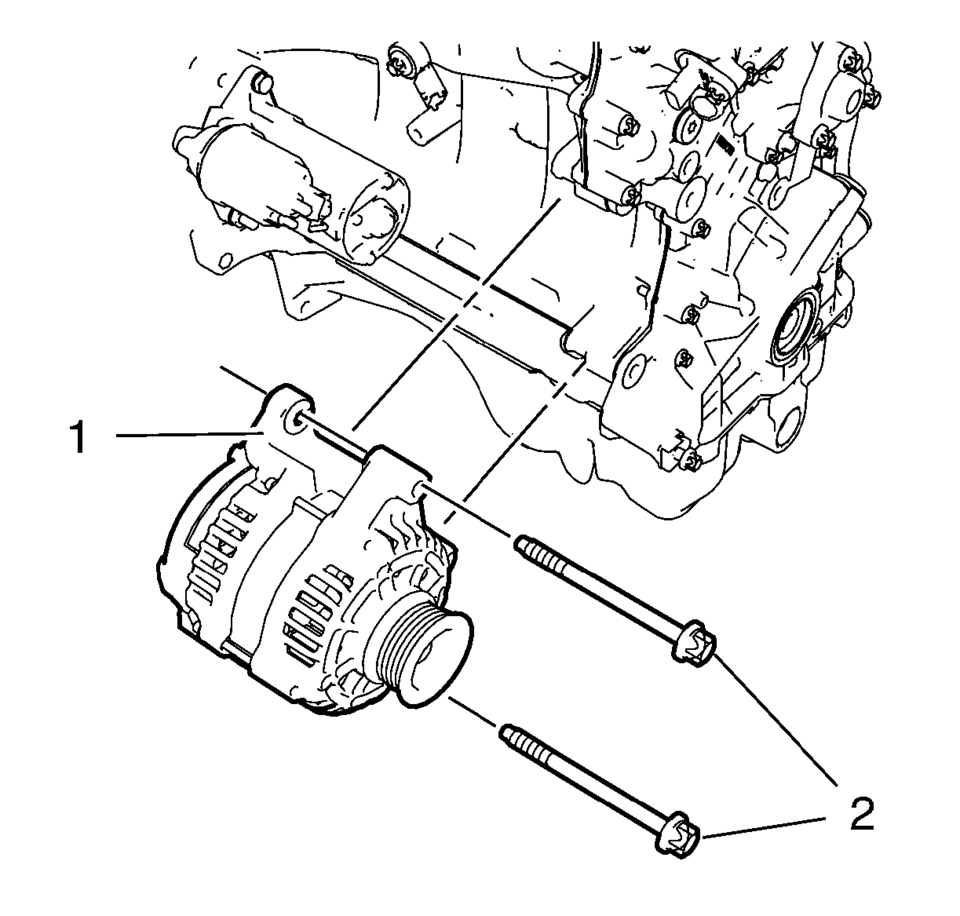
- Install the generator (1).
- Install the 2 generator bolts (2) and tighten to 35 Y (26 lb ft)
.
Caution:
Refer to Fastener Caution.
 Engine Replacement (Manual Transmission)
Special Tools
J-45859 Wheel Drive Shaft Remover .
CH-807 Closure Plugs .
For equivalent regional tools, refer to Special Tools.
Removal Procedure
Remove the battery and b ...
 Generator Removal
Remove the 2 generator bolts (2).
Remove the generator (1).
...
Other materials:
Doing Your Own Service Work
Warning
It can be dangerous to work on your vehicle if you do not have the proper
knowledge, service manual, tools, or parts. Always follow owner manual procedures
and consult the service manual for your vehicle before doing any service work.
If doing some of your own service work, use the pro ...
Front Floor Console Replacement
Front Floor Console Replacement
Callout
Component Name
Preliminary Procedures
Remove the right and left front floor console extensions. Refer
to Front Floor Console Extension Replacement - Right Side and Front
Floor Conso ...
Front Seat Cushion Outer Trim Panel Replacement
Front Seat Cushion Outer Trim Panel Replacement
Callout
Component Name
Preliminary Procedures
Remove the driver or passenger seat recliner handle. Refer to Front
Seat Back Recliner Handle Replacement
Remove the front seat ...

0.0129