
Chevrolet Sonic Owner's Manual: Hazard Warning Flashers
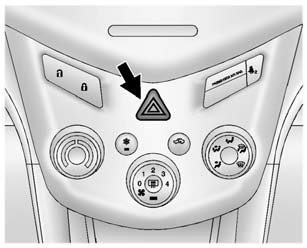
 (Hazard Warning Flasher): Press
and momentarily hold this button to make the front and rear turn signal lamps flash
on and off. This warns others that you are having trouble. Press and momentarily
hold again to turn the flashers off.
 Automatic Headlamp System
When it is dark enough outside and the exterior lamp control is in the automatic
position, the headlamps come on automatically. See Exterior Lamp Controls.
The vehicle has a light sensor on top o ...
 Turn and Lane-Change Signals
Move the lever all the way up or down to signal a turn.
An arrow on the instrument cluster will flash in the direction of the turn or
lane change.
Raise or lower the lever until the arrow starts ...
Other materials:
Filling a Portable Fuel Container
Warning
Filling a portable fuel container while it is in the vehicle can cause fuel
vapors that can ignite either by static electricity or other means. You or others
could be badly burned and the vehicle could be damaged. Always:
. Use approved fuel containers.
. Remove the container from ...
Front Wheelhouse Liner Replacement (Front)
Front Wheelhouse Liner Replacement
Callout
Component Name
Preliminary Procedure
Remove the tire and wheel assembly. Refer to Tire and Wheel Removal and
Installation.
1
Front Wheelhouse Liner Scr ...
Crankshaft Rear Oil Seal Replacement
Special Tools
EN-658 Rear Main Seal Installer
For equivalent regional tools, refer to Special Tools.
Removal Procedure
If equipped with automatic transmission, remove the flex plate. Refer
to Automatic Transmission Flex Plate Replacement.
If equipped with a manual transmis ...

0.0081