
Chevrolet Sonic Repair Manual: Headlamp Replacement
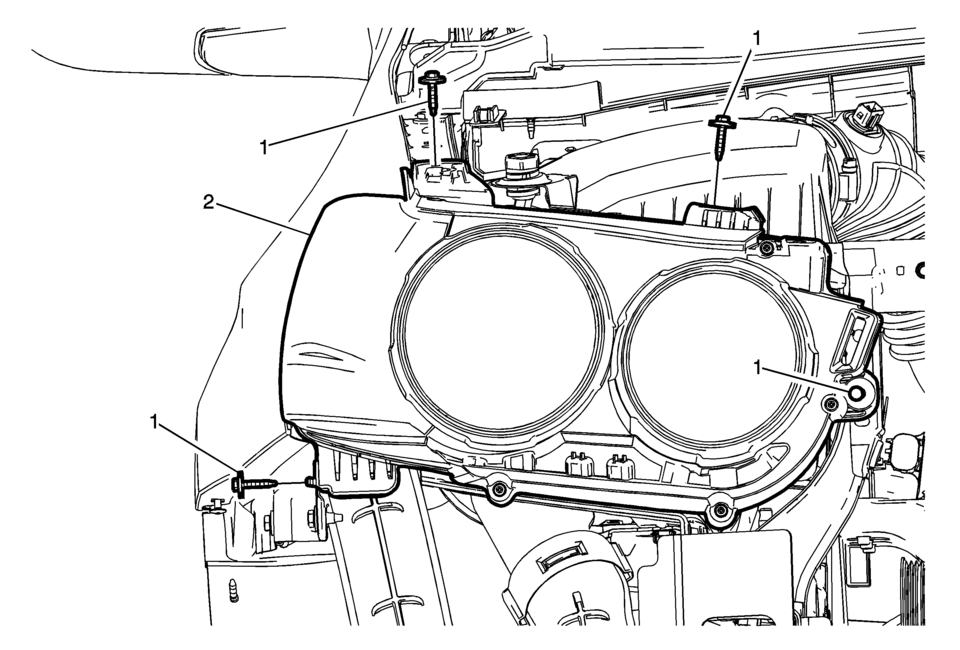
|
Callout |
Component Name |
|---|---|
|
Preliminary Procedure
Remove the front bumper fascia. Refer to Front Bumper Fascia Replacement. |
|
|
1 |
Headlamp Assembly Screw (Qty:?€‰4) Caution: Refer to Fastener Caution.
2.5?€‰Y (22?€‰lb?€‰in) |
|
2 |
Headlamp Assembly Procedure
|
 Headlamp Housing Bracket Replacement
Headlamp Housing Bracket Replacement
Callout
Component Name
Preliminary Procedure
Remove the front bumper fascia. Refer to Fron ...
 Headlamp Switch Replacement
Headlamp Switch Replacement
Callout
Component Name
Preliminary Procedure
Remove the instrument panel lower trim pad cover. Refe ...
Other materials:
Exhaust Rear Muffler Heat Shield Replacement
Exhaust Rear Muffler Heat Shield Replacement
Callout
Component Name
Preliminary Procedure
Disconnect the exhaust system hangers in the rear and allow the exhaust
system to rest on the rear axle.
1
...
Turbocharger Wastegate Regulator Solenoid Valve Replacement
Charge Air Bypass Regulator Solenoid Valve Replacement
Callout
Component Name
Preliminary Procedure
Disconnect the radiator outlet hose from the water inlet. Refer to Water
Inlet Replacement.
1
...
Control Solenoid Valve and Transmission Control Module Assembly Replacement
Removal Procedure
Remove the transmission control valve body cover.
Refer to Control Valve Body Cover Replacement.
Disconnect the output speed sensor electrical connector (2).
Disconnect the shift position switch electrical connector (3).
Disconn ...

0.0061