
Chevrolet Sonic Repair Manual: Headlining Trim Panel Replacement (Hatchback without Sunroof)
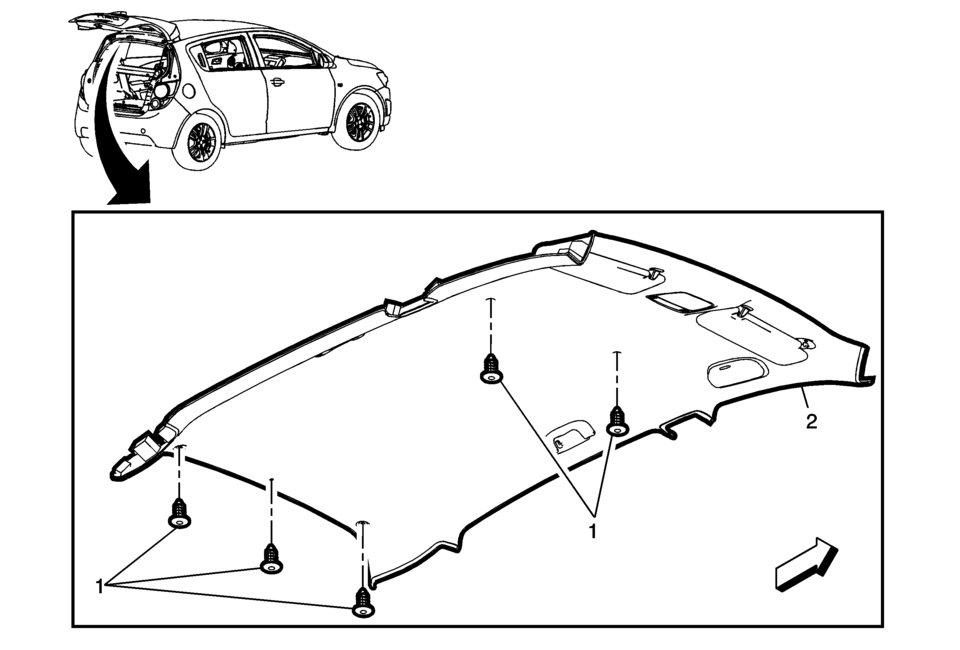
|
Callout |
Component Name |
|---|---|
|
Warning: Do not attempt to repair or alter the head impact energy-absorbing material glued to the headliner or to the garnish trims. If the material is damaged, replace the headliner and/or the garnish trim. Failure to do so could result in personal injury. Caution: If a vehicle is equipped with a head curtain inflator module ensure that the inflator module and tether are undamaged. If tether or curtain airbag are damaged in any way, they must be replaced. Caution: Use care when working around the head curtain inflator module. Sharp tools may puncture the curtain airbag. If the head curtain inflator module is damaged in any way, it must be replaced.
|
|
|
1 |
Headliner Trim Panel Retainer?€‰(Qty:?€‰5) |
|
2 |
Headliner Trim Panel Assembly Procedure
Disconnect the electrical connectors. Note: When installing a new headliner, tape any unused connector to the headliner with a high adhesive tape. |
 Headlining Trim Panel Replacement (Hatchback with Sunroof)
Headlining Trim Panel Replacement
Callout
Component Name
Warning: Do not attempt to repair or alter the head impact
energ ...
 Headlining Trim Panel Replacement (Sedan with Sunroof)
Headlining Trim Panel Replacement
Callout
Component Name
Warning: Do not attempt to repair or alter the head impact
energ ...
Other materials:
Push-button ignition switch operation
CAUTION
Avoid leaving your Nissan Armada with the ignition switch in the ON position
while the engine is not running for extended periods, as this can drain the
battery.
Use electrical accessories in your Nissan Armada primarily when the engine
is running. If accessories must be used ...
How to enable/disable the BSW system
Vehicle information display
Steering-wheel-mounted controls (right side)
To configure the Nissan Armada BSW system, follow these steps:
1. Press the
button until "Settings" appears in the vehicle information display, then confirm
using the scroll dial. Navigate to " ...
I-BSI system operation
Example
Side indicator light
I-BSI ON indicator (vehicle information display)
I-BSI indicator (vehicle information display)
ProPILOT Assist switch (design may vary depending on Nissan Armada model)
The Nissan Armada I-BSI system becomes active at speeds above approximately 37
MPH ...

0.011