
Chevrolet Sonic Repair Manual: Horn Replacement
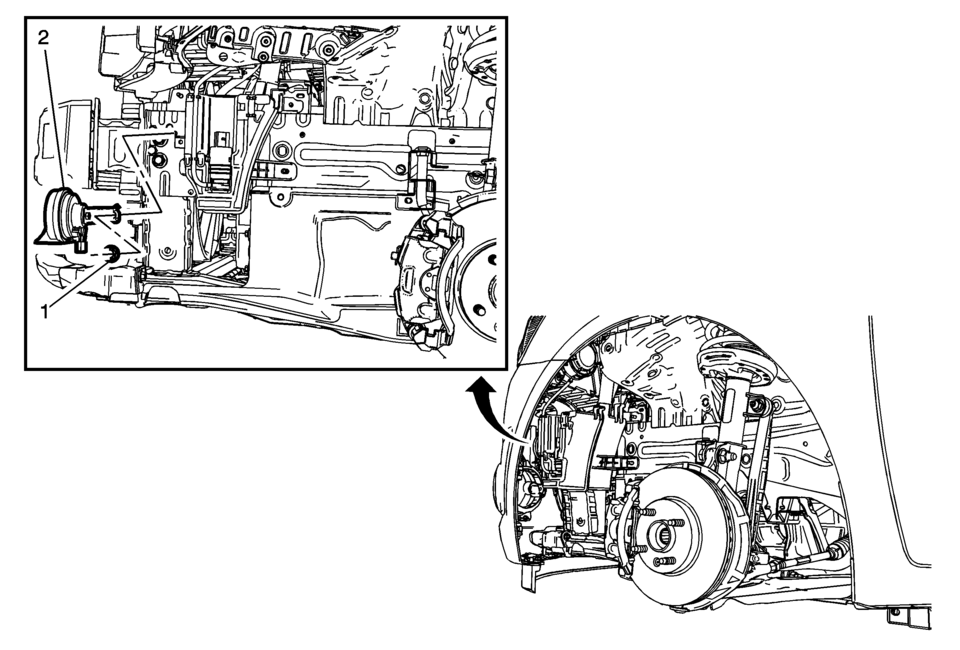
|
Callout |
Component Name |
|---|---|
|
Preliminary Procedure
Remove the front wheelhouse liner front. Refer to Front Wheelhouse Liner Replacement. |
|
|
1 |
Horn Nut Caution: Refer to Fastener Caution.
17?€‰Y (13?€‰lb?€‰ft) |
|
2 |
Horn Procedure
Disconnect the electrical connector. |
 Horn
Horn
...
 Horns System Description and Operation
System Description
The horn system consists of the following components:
HORN fuse
Underhood fuse block (contains PCB horn relay)
Horn switch
Horn
Body control module (BCM)
...
Other materials:
Drum Brake Adjusting Hardware Inspection
Warning: Refer to Brake Dust Warning.
Visually inspect the adjuster actuator spring (1) for the following conditions:
Excessive stretching
Excessive bending
Excessive corrosion
Broken
Missing
If any of the conditions listed were found, the adjuster actu ...
Engine Coolant Temperature Sensor Replacement (Water Outlet)
Engine Coolant Temperature Sensor Replacement
Callout
Component Name
Preliminary Procedure
Disconnect the negative battery cable. Refer to Battery Negative
Cable Disconnection and Connection.
Drain the cooling system. Ref ...
Differential lock mode switch
The rear differential lock (DIFF-LOCK) in the Nissan Armada is designed to distribute
engine torque evenly between the left and right rear wheels, ensuring balanced traction
in demanding driving conditions.
When the Nissan Armada becomes stuck in challenging environments such as sand,
sno ...

0.0072