
Chevrolet Sonic Repair Manual: How to Identify Plastic Parts
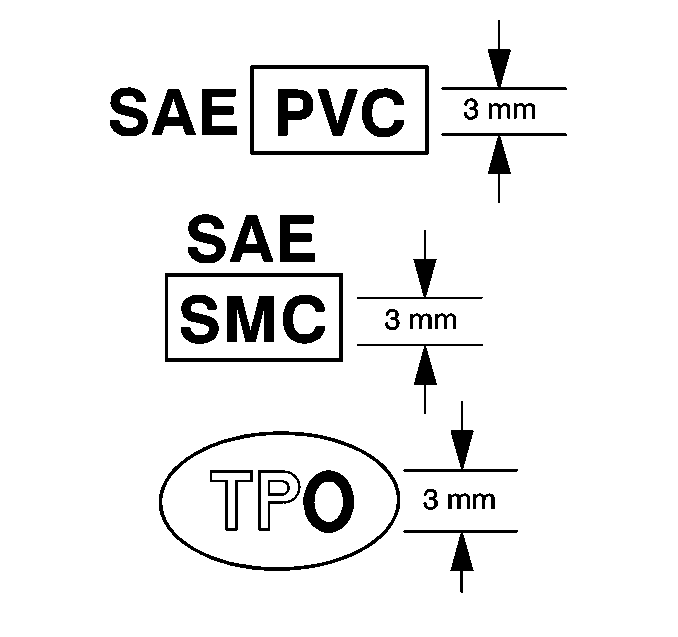
Plastic parts can be identified by the SAE code, which is usually found on the rear of the part, and/or by the characteristics of the plastic. Knowing the type of plastic aids in selecting the proper repair materials and in selecting the proper repair procedure.
Look for the SAE code stamped into the part.
- Code Found
-
Match the code to those in the plastic identification chart to determine whether the plastic is thermoplastic or thermoset plastic, and whether the plastic is rigid or flexible. Refer to Plastic Identification and Refinishing Systems.
- No Code Found
-
Warning:
Do NOT use a plastic burn test to distinguish the type of plastic. The burn test produces vapors which are harmful.
Perform one or both of the following tests to determine if the part is thermoplastic polyolefin or thermoset non-polyolefin.
- Float Test
-
- Cut a shaving of plastic from the back of the part.
The shaving should be free of mold release agents and paint.
- Place the shaving in a container of water.
- Thermoplastic polyolefin floats.
- Thermoset non-polyolefin sinks.
- Cut a shaving of plastic from the back of the part.
- Abrasion Test
-
- Sand a spot near the damaged area with Grade?€‰36 Roloc Disc.
- Thermoplastic polyolefin material melts or frays when sanded.
- Thermoset non-polyolefin material sands cleanly.
Thermoplastic and thermoset plastics can be either rigid or flexible. Thermoplastic plastic parts are best repaired with a hot iron plastic material-feed welder, but are usually replaced. Thermoset plastic can be repaired with epoxy or other more rigid 2 package repair material.
For general repair instructions, refer to General Plastic Repair.
 General Plastic Repair
Warning: In order to reduce the risk of personal injury when exposed
to toxic fumes while grinding, cutting, or applying repair material on any type
of sheet molded compound or RIM rigid plas ...
 Plastic Collar Quick Connect Fitting Service
Removal Procedure
Warning: Refer to Gasoline/Gasoline Vapors Warning.
Note: There are several types of plastic collar fuel and evaporative
emission quick conne ...
Other materials:
Rear Side Door Window Switch Replacement
Rear Side Door Window Switch Replacement
Callout
Component Name
Preliminary Procedure
Remove the rear side door window switch bezel. Refer to Rear Side Door
Window Switch Bezel Replacement.
1
Re ...
Shoulder Belt Replacement - Rear (Hatchback)
Shoulder Belt Replacement - Rear
Callout
Component Name
Preliminary Procedures
Remove the rear seat cushion. Refer to Rear Seat Cushion Removal
and Installation.
Remove the body lock pillar upper trim. Refer to Body Lock ...
Rear Seat Center Shoulder Belt Replacement (Sedan)
Rear Seat Center Shoulder Belt Replacement
Callout
Component Name
Preliminary Procedures
Remove the rear seat cushion. Refer to Rear Seat Cushion Removal and
Installation.
1
Rear Seat Center Sho ...

0.0098