
Chevrolet Sonic Repair Manual: Input Shaft Disassemble
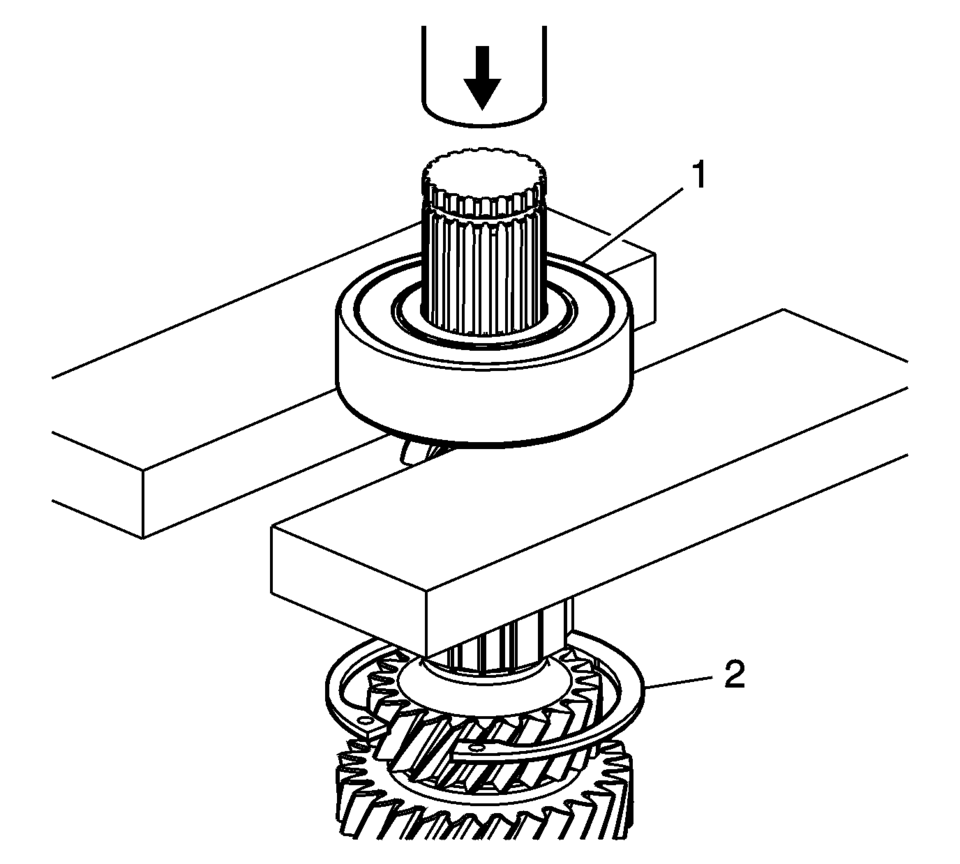
- Remove the input shaft rear bearing assembly (1) using a hydraulic press.
- Remove the retaining ring (2).
Note:
The input shaft rear bearing retaining ring (2) remains loose on the shaft.
 Input Shaft Assemble
Special Tools
J-840733 Driver
For equivalent regional tools, refer to Special Tools.
Note: Ensure the input shaft rear bearing retaining ring (2) is
placed on the input s ...
 Main Shaft Assemble (Gen 1)
Special Tools
3-0207944 Main Shaft Tapered Bearing Insert Tool
For equivalent regional tools, refer to Special Tools.
Install the 4th gear bearing assembly (1).
Note: T ...
Other materials:
Radio Antenna Base Replacement
Radio Antenna Base Replacement
Callout
Component Name
Preliminary Procedure
Lower the rear of the headlining trim panel. Refer to
Headlining Trim Panel Replacement.
1
Radio Antenna Base Fastener
...
Heated Seat Control Module Programming and Setup
The seat heating control module must be programmed with the proper calibration
software. The module stores and utilizes this information however if it is not properly
configured with the correct calibration software, the seat heating control module
will not control all of the vehicle features ...
Safety information
WARNING
Always stop the Nissan Armada in a safe place and engage the parking
brake before operating the system. Using the system while driving can distract
the driver and increase the risk of accidents.
Maintain full attention on driving at all times. If the Nissan Armada
system respo ...

0.007