
Chevrolet Sonic Repair Manual: Input Shaft Support Replacement (Gen 2)
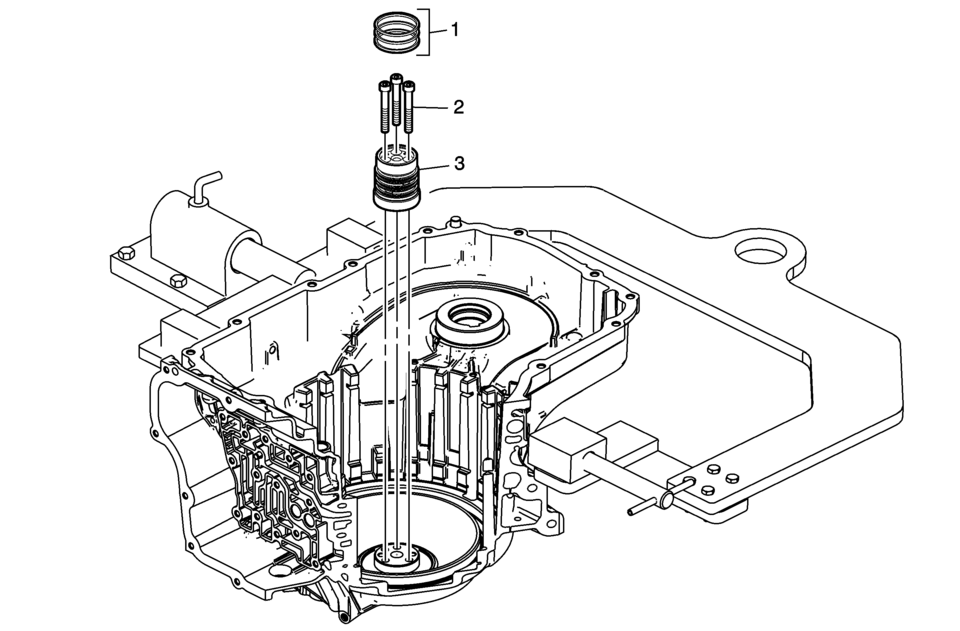
|
Callout |
Component Name |
|---|---|
|
1 |
3-5 Reverse and 4-5-6 Clutch Fluid Seals (Qty: 3) Note:
|
|
2 |
Input Shaft Support Bolts M6 x 50 (Qty: 3) Caution: Refer to Fastener Caution.
12 Y (106 lb in) |
|
3 |
Input Shaft Support Note: Inspect the support for wear, damage or porosity. |
 Input Shaft Support Replacement (Gen 1)
Input Shaft Support Replacement
Callout
Component Name
1
3-5 Reverse and 4-5-6 Clutch Fluid Seals (Qty: 4)
...
 Input Speed Sensor Replacement
Removal Procedure
Remove the control solenoid valve and transmission
control module assembly. Refer to Control Solenoid
Valve and Transmission Control Module Assembly Replacement. ...
Other materials:
Front Seats
The front seats have adjustable head restraints in the outboard seating positions.
Adjust the head restraint so that the top of the restraint is at the same height
as the top of the occupant's head. This position reduces the chances of a neck injury
in a crash.
The height of the head r ...
Brake Assist
This vehicle has a brake assist feature designed to assist the driver in stopping
or decreasing vehicle speed in emergency driving conditions. This feature automatically
uses the stability system hydraulic brake control module to supplement the power
brake system under conditions where the dri ...
Rear Window Panel Trim Replacement
Rear Window Panel Trim Replacement
Callout
Component Name
Preliminary Procedures
Remove the body lock pillar upper trim panel. Refer to Body Lock
Pillar Upper Trim Panel Replacement.
Remove the body rear seat back trim pa ...

0.0074