
Chevrolet Sonic Repair Manual: Input Speed Sensor Replacement
- Removal Procedure
-
- Remove the control solenoid valve and transmission control module assembly. Refer to Control Solenoid Valve and Transmission Control Module Assembly Replacement.
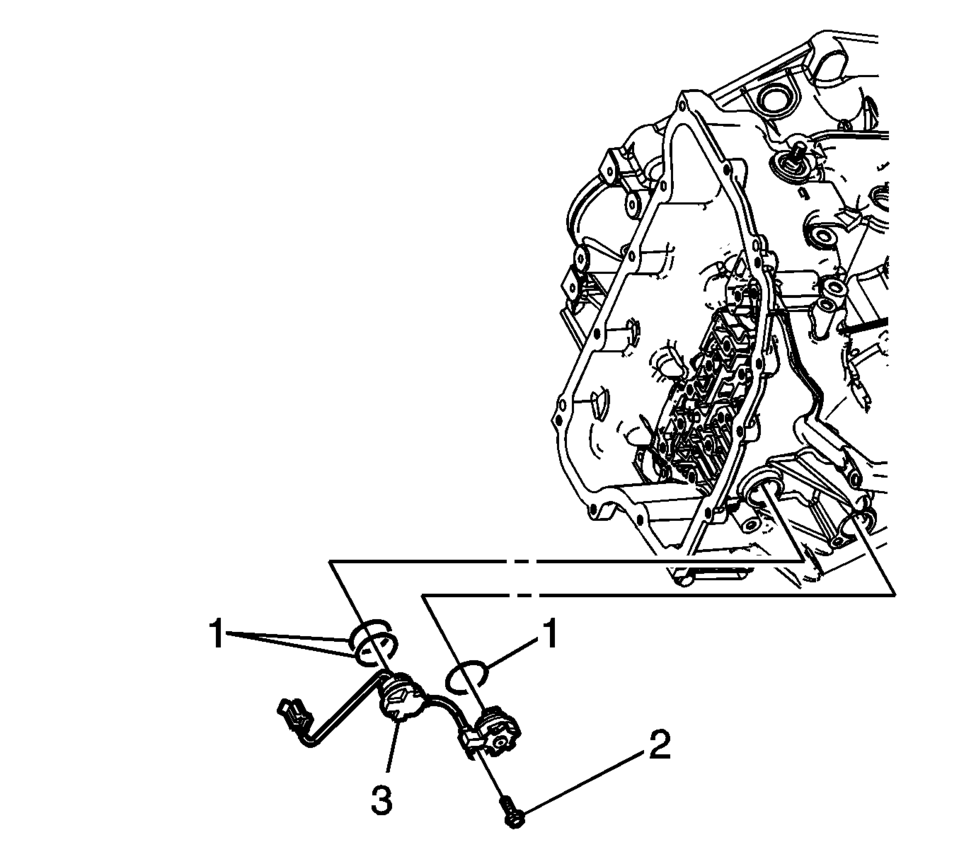
- Remove the input speed sensor bolt (2) M6 x 23.
- Unlock the 2 retaining tabs inside the transmission housing.
- Remove the input speed sensor (3).
- Remove the 3 input speed sensor seals (1).
- Installation Procedure
-
- Install the 3 input speed sensor seals (1).
- Install the input speed sensor (3).
- Verify that the retaining tabs are locked completely.
- Install the input speed sensor bolt (2) M6 x 23 and tighten to 9 Y (80 lb in)
.
- Install the control solenoid valve and transmission control module assembly. Refer to Control Solenoid Valve and Transmission Control Module Assembly Replacement.
- Perform the transmission adaptive values learn procedure. Refer to Transmission Adaptive Values Learn.
Caution:
Refer to Fastener Caution.
 Front Wheel Speed Sensor Replacement
Removal Procedure
Warning: Refer to Brake Dust Warning.
Raise and support the vehicle. Refer to Lifting and Jacking the Vehicle.
Remove the tire and wheel assembly. Refer ...
 Input and Output Speed Sensor Installation
Input and Output Speed Sensor Installation
Callout
Component Name
1
Input Speed Sensor Assembly Seals
2 ...
Other materials:
Rail Dust Damage Repair
Warning: Refer to Eye Protection Warning.
Note: If rail dust has penetrated into the basecoat, the panel requires
refinishing. Ensure all the rail dust has been removed prior to refinishing
or the rust spots will return.
Rail dust damage comes from the tiny iron particles produce ...
Drive Range, Sixth Gear (Gen 2)
As vehicle speed increases, the transmission control module (TCM) processes input
signals from the automatic transmission input and output speed sensors, the throttle
position sensor and other vehicle sensors to determine the precise moment to command
ON the normally-low 26 pressure control so ...
Flat towing your vehicle
Flat towing
Flat towing—also referred to as dinghy towing or “4-down� towing—means towing
your Nissan Armada with all four wheels in contact with the ground.
This method is commonly used when a vehicle is towed behind a motorhome or recreational
vehicle. However, it is critical to unde ...

0.0061