
Chevrolet Sonic Owner's Manual: Instrument Panel Storage
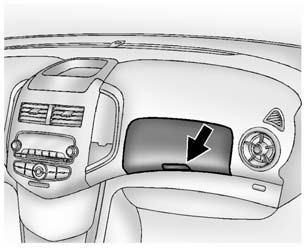
Lift up on the lever to open.
If equipped, the storage area has an auxiliary input jack and USB port inside.
 Storage Compartments
Warning
Do not store heavy or sharp objects in storage compartments. In a crash, these
objects may cause the cover to open and could result in injury. ...
 Glove Box
Lift up on the glove box lever to open it. ...
Other materials:
Customer Assistance Office
Chevrolet encourages customers to call the toll-free number for assistance. However,
if a customer wishes to write or e-mail Chevrolet, the letter should be addressed
to:
United States and Puerto Rico
Chevrolet Motor Division
Chevrolet Customer Assistance Center
P.O. Box 33170
Detroit, MI 4 ...
Retained Accessory Power Description and Operation
Retained Accessory Power
RAP Description and Operation Block Diagram
K9Body
Control
ModuleK73Telematics
Communication
Interface
Control ModuleA11RadioKR76Retained
Accessory
Power
Relay
Hard-W ...
Transmission Rear Mount Bracket Replacement
Removal Procedure
Raise and support the vehicle. Refer to
Lifting and Jacking the Vehicle.
Remove the front suspension skid plate, if equipped.
Refer to Drivetrain and Front Suspension Frame Skid
Plate Replacement.
Using a suitable jack stand, support the rear of the ...

0.0061