
Chevrolet Sonic Owner's Manual: License Plate Lamp
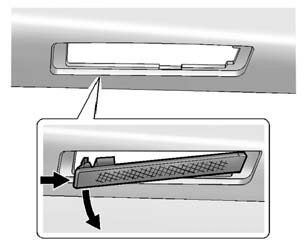
Lamp Assembly
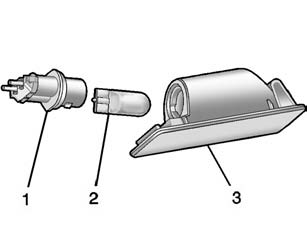
Bulb Assembly
1. Bulb Socket
2. Bulb
3. Lamp Assembly
To replace one of these bulbs:
1. Push the left end of the lamp assembly toward the right.
2. Turn the lamp assembly down to remove it.
3. Turn the bulb socket (1) counterclockwise to remove it from the lamp assembly (3).
4. Pull the bulb (2) straight out of the bulb socket (1).
5. Push the replacement bulb straight into the bulb socket and turn the bulb socket clockwise to install it into the lamp assembly.
6. Turn the lamp assembly into the lamp assembly opening engaging the clip side first.
7. Push on the lamp side opposite the clip until the lamp assembly snaps into place.
 Taillamps, Turn Signal, Stoplamps, and Back-Up Lamps
Sedan Taillamp Shown, Hatchback Taillamp Similar
1. Back-up Lamp
2. Turn Signal Lamp
3. Stop Lamp/Taillamp
4. Sidemarker Lamp
To replace one of these bulbs:
1. Open the trunk.
2. Remove the ...
 Replacement Bulbs
For replacement bulbs not listed here, contact your dealer. ...
Other materials:
Connecting and Controlling an iPod®
Not all iPods can be controlled by the infotainment system.
Connecting an iPod
Connect the iPod to the USB port.
Searching for a Track
Tracks can be searched for by:
Playlists
Artists
Albums
Song Titles
Podcasts
Genres
Audiobooks
Composers
To search for tracks:
1. Turn the ...
Shift Fork Cleaning and Inspection (Gen 2)
Warning: Wear safety glasses to avoid injury when using compressed
air or any cleaning solvent. Bodily injury may occur if fumes are inhaled
or if skin is exposed to chemicals.
Clean the following components with a suitable solvent.
Air dry all the parts.
3rd and ...
USB (Universal Serial Bus) charging connector
In the Nissan Armada, the Type-C USB charging connector 1 is предназначен exclusively
for charging external devices such as smartphones, tablets, and other portable electronics.
To begin charging in the Nissan Armada, simply connect a compatible USB device
into the connector. On ...

0.0047