
Chevrolet Sonic Repair Manual: Liftgate Strut Replacement
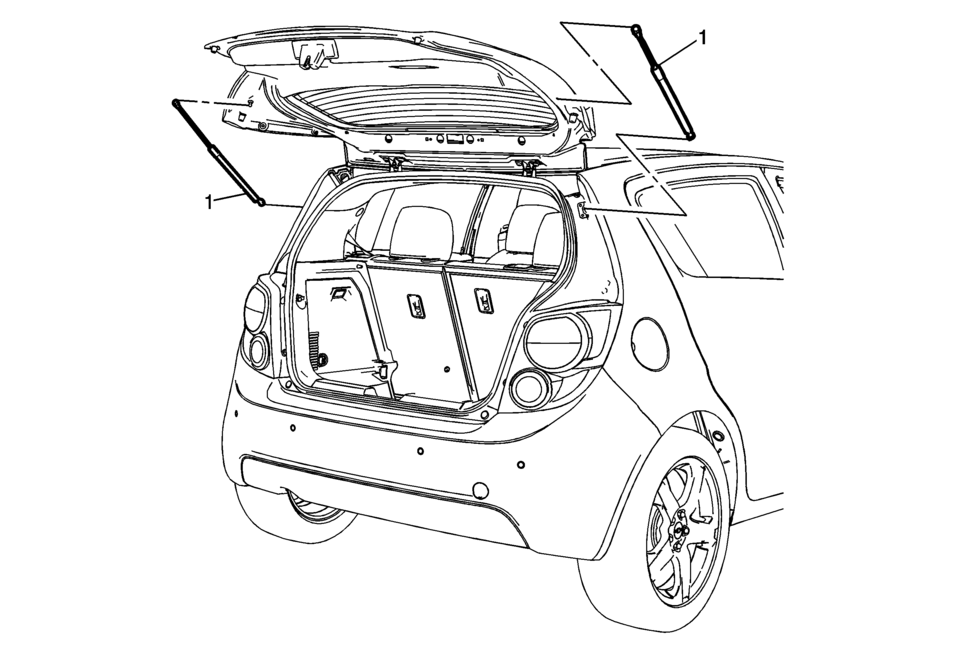
|
Callout |
Component Name |
|---|---|
|
1 |
Liftgate Strut Warning: When a lift gate hold open device is being removed or installed, provide alternate support to avoid the possibility of damage to the vehicle or personal injury. Caution: Apply pressure only at the end of the liftgate/hood assist rod that you are removing or attaching. Do NOT apply pressure to the middle of the rod because damage or bending will result.
|
 Steering Knuckle Replacement
Removal Procedure
Raise and support the vehicle. Refer to Lifting and Jacking the Vehicle.
Remove the tire and wheel assembly. Refer to Tire and Wheel Removal
and Installation. ...
 Strut Assembly Removal and Installation
Special Tools
CH 49375 Strut Rod Nut Socket
For equivalent regional tools, refer to Special Tools
Removal Procedure
Remove the air inlet grille panel. Refer to Air Inlet Grill ...
Other materials:
System Operation
The vehicle has a Traction Control System (TCS) and StabiliTrak®, an electronic
stability control system. These systems help limit wheel slip and assist the driver
in maintaining control, especially on slippery road conditions.
TCS activates if it senses that any of the drive wheels are spinni ...
Aluminum Wheel Refinishing
Finish Damage Evaluation Procedure
Note:
If the wheels are chrome-plated, do not re-plate or refinish
the wheels.
If the wheels are polished aluminum, do not refinish the wheels
in the dealer environment. Utilize a refinisher that meets manufacturer
...
Charge Air Cooler Replacement
Charge Air Cooler Replacement
Callout
Component Name
Preliminary Procedures
Disconnect the negative battery cable. Refer to Battery Negative
Cable Disconnection and Connection.
Raise and properly support the vehicle. Refe ...

0.0086