
Chevrolet Sonic Owner's Manual: Maintenance
Air Intake
Clear away any ice, snow, or leaves from the air intake at the base of the windshield that can block the flow of air into the vehicle.
Passenger Compartment Air Filter
The filter removes dust, pollen, and other airborne irritants from outside air that is pulled into the vehicle.
The filter should be replaced as part of routine scheduled maintenance. See Maintenance Schedule. To find out what type of filter to use, see Maintenance Replacement Parts.
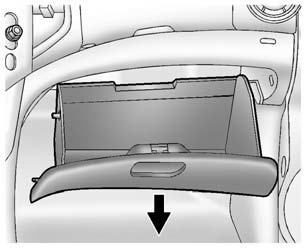
1. Open the glove box completely and pull it to remove.
2. Remove the filter cover by unscrewing both sides of the cover.
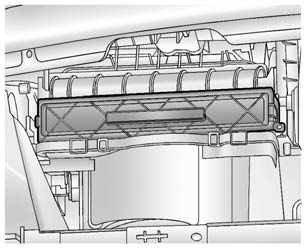
3. Install the new air filter.
4. Reinstall the air filter cover and glove box in reverse order.
See your dealer if additional assistance is needed.
 Air Vents
Use the air vents located in the center and on the side of the instrument panel
to direct the airflow. Move the slats on the center air vents to direct airflow.
Turn the knobs on the side air vents ...

Other materials:
Cleaning High Gloss Surfaces and Vehicle Information and Radio Displays
For vehicles with high gloss surfaces or vehicle displays, use a microfiber cloth
to wipe surfaces. Before wiping the surface with the microfiber cloth, use a soft
bristle brush to remove dirt that could scratch the surface. Then use the microfiber
cloth by gently rubbing to clean. Never use w ...
Torque Converter Housing with Fluid Pump Assembly Installation (6T40/45/50 Non
Hybrid)
Torque Converter Housing with Fluid Pump Assembly Installation
Callout
Component Name
1
Fluid Pump Seal Assembly
2
Torque Converter Housing Gasket
3
Torque Converte ...
Clutch Pedal Position Sensor Replacement
Removal Procedure
Remove the instrument panel lower trim pad cover.
Refer to Instrument Panel Lower Trim Pad Cover Replacement.
Remove the clutch pedal position sensor bolt (2).
Remove the clutch pedal position sensor (1).
Disconnect the clu ...

0.0055