
Chevrolet Sonic Owner's Manual: Manual Mode
To use this feature:
1. Move the shift lever from D (Drive) rearward to M(Manual Mode).
While driving in manual mode, the transmission will remain in the driver selected gear. When coming to a stop in the manual position, the vehicle will automatically shift into 1 (First) gear.
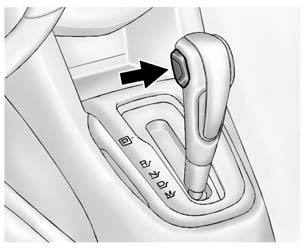
2. Press the + (plus) end of the button on the side of the shift lever to upshift, or press the − (minus) end of the button to downshift.
The Driver Information Center (DIC) in the instrument cluster will change from the currently displayed message to the letter “M,� for Manual position, and a number indicating the requested gear.
While using manual mode, the transmission will have firmer shifting and sportier performance. You can use this for sport driving or when climbing hills to stay in gear longer or to downshift for more power or engine braking.
The transmission will only allow you to shift into gears appropriate for the vehicle speed and engine revolutions per minute (rpm):
- The transmission will not automatically shift to the next higher gear if the vehicle speed or engine rpm is too low.
- The transmission will not allow shifting to the next lower gear if the vehicle speed or engine rpm is too high.
 Automatic Transmission
P (Park): This position locks the front wheels. It is the best position to use
when you start the engine because the vehicle cannot move easily.
Warning
It is dangerous to get out of the vehicle ...
 Manual Transmission
The vehicle may be equipped with a 5-speed or 6-speed manual transmission.
Caution
Shifting the vehicle initially into any gear other than 1 (First) or R (Reverse)
can damage the clutch. Shift t ...
Other materials:
Exhaust Manifold with Catalytic Converter Replacement (LUW)
Exhaust Manifold with Catalytic Converter Replacement
Callout
Component Name
Warning: Refer to Protective Goggles and Glove Warning.
Warning: Refer to Exhaust Service Warning.
Preliminary Procedure
...
Drive Range, First Gear (Gen 2)
As the vehicle speed increases, the transmission control module (TCM) receives
input signals from the automatic transmission input and output speed sensors, throttle
position sensor and other vehicle sensors to determine the precise moment to de-energize
or ?urn OFF?the shift solenoid, and to ...
Readiness for Inspection/Maintenance (I/M) test
WARNING
A Nissan Armada equipped with Four-Wheel Drive (4WD) must never be tested
on a two-wheel dynamometer or similar equipment used in some emissions testing facilities.
Always inform inspection personnel that your Nissan Armada is a 4WD vehicle
before testing begins.
Using incorrect testi ...

0.0058