
Chevrolet Sonic Repair Manual: Overview (Radio with CD/USB)
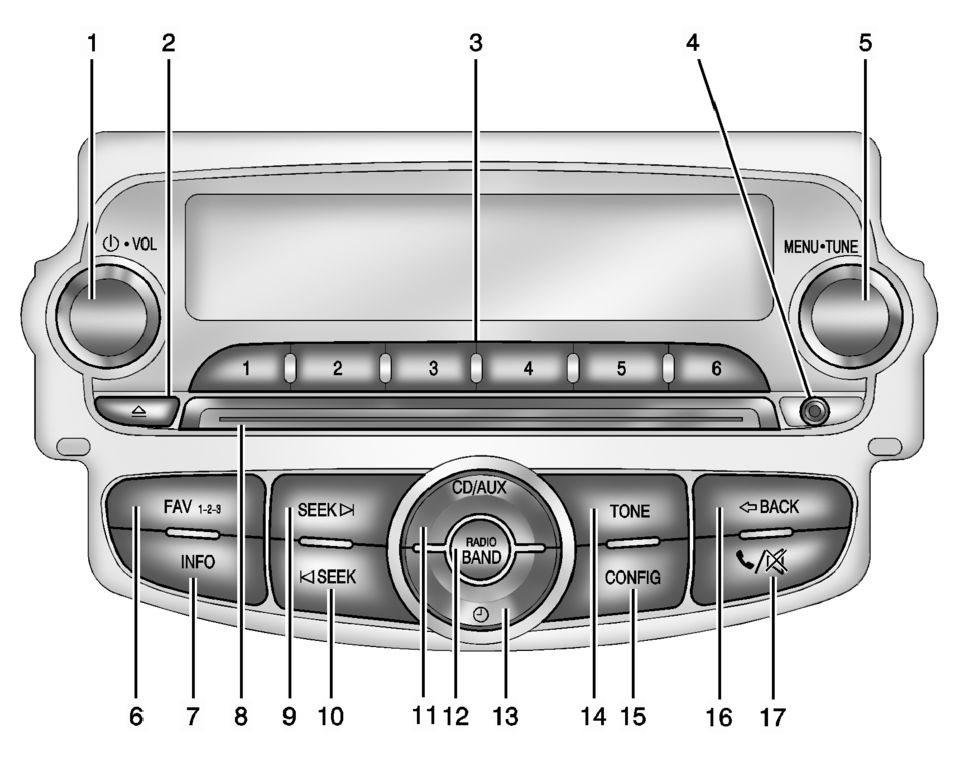
- O /VOL (Power/Volume)
- Turns the system on or off and adjusts the volume.
- Removes a disc from the CD slot.
- Radio: Saves and selects favorite stations.
- 3.5 mm (1/8 in) connection for external devices.
- Radio: Manually selects radio stations.
- CD: Selects tracks.
- Radio: Opens the favorites list.
- Radio: Shows available information about the current station.
- CD: Shows available information about the current track.
- Radio: Seeks the next station.
- CD: Selects the next track or fast forwards within a track.
- Radio: Seeks the previous station.
- CD: Selects the previous track or rewinds within a track.
- Selects the CD player or an external audio source.
- Changes the band while listening to the radio.
- Selects the radio when listening to a different audio source.
- Opens the Clock menu.
- Opens the Tone menu.
- Opens the Configuration menu.
- Menu: Moves one level back.
- Character Input: Deletes the last character.
- Opens the Phone menu.
- Mutes the audio system.
 Overview (AM-FM Radio)
45tune<=backtoneseekl>klseekpushmenu101112131415
FAV 1-2-3 (Favorites)
Radio: Opens the favorites list.
O /VOL (Power/Volume)
Turns the system on or off and adjusts the volum ...
 Overview (Radio with Touchscreen)
z VOL
y (Volume)
Press to decrease or increase the volume.
O (Power)
Press and hold to turn the power on or off.
D (Home Page)
Press to go to the Home Page. See Hom ...
Other materials:
Rear Disc Brake Mounting and Hardware Inspection
Warning: Refer to Brake Dust Warning.
Caution: Support the brake caliper with heavy mechanic wire, or
equivalent, whenever it is separated from its mount and the hydraulic flexible
brake hose is still connected. Failure to support the caliper in this manner
will cause the f ...
Tire Pressure Indicator Sensor Learn
Special Tools
EL-46079 Tire Pressure Monitor Diagnostic Tool
EL-50448 Tire Pressure Monitor Sensor Activation Tool
For equivalent regional tools, refer to Special Tools.
Learn Mode Description
The tire pressure monitor system uses the instrument cluster, body control
module (B ...
Valve Guide Reaming, and Valve and Seat Grinding
Valve Cleaning Procedure
Use soft bristle wire brush to clean any carbon build-up from the valve
head. DO NOT use a wire brush on any part of the valve stem. The valve stem
is chrome plated to provide enhanced wear characteristics. Wire brushing
the stem could remove the chr ...

0.0062