
Chevrolet Sonic Repair Manual: Overview (Radio with Touchscreen)
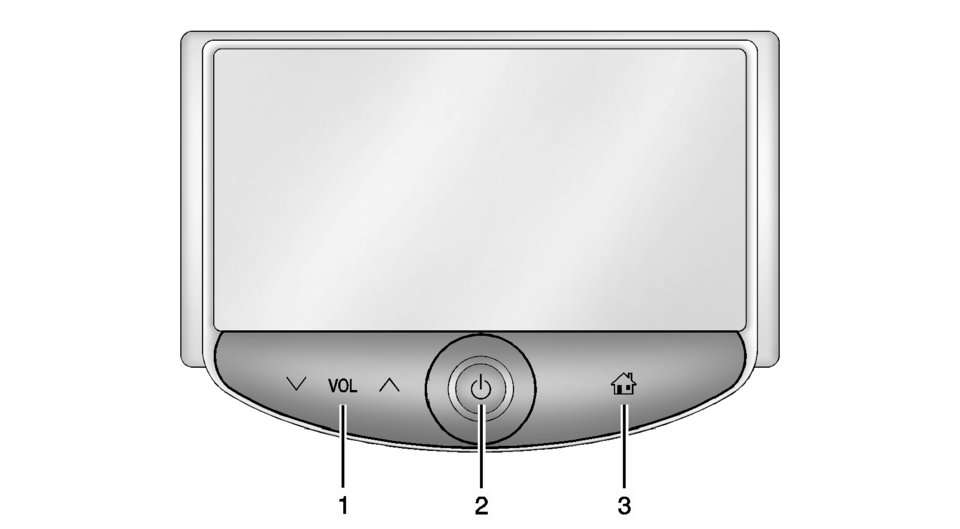
- z VOL y (Volume)
- Press to decrease or increase the volume.
- Press and hold to turn the power on or off.
- Press to go to the Home Page. See Home Page.
 Overview (Radio with CD/USB)
91011121314151617
O /VOL (Power/Volume)
Turns the system on or off and adjusts the volume.
Z (Eject)
Removes a disc from the CD slot.
Buttons 1−6
Radio: Saves a ...
 Smartphone Link (Overview)
Before Using Smartphone Link
If equipped, the vehicle can connect to Pandora®, Stitcher SmartRadio™, or other
available applications through the infotainment system. The applications must be
...
Other materials:
Finish Care
Application of aftermarket clearcoat sealant/wax materials is not recommended.
If painted surfaces are damaged, see your dealer to have the damage assessed and
repaired. Foreign materials such as calcium chloride and other salts, ice melting
agents, road oil and tar, tree sap, bird droppings, ...
Camshaft Sprocket Installation
Install the intake camshaft sprocket (3).
Install the intake camshaft position sensor exciter wheel (2) and the intake
camshaft sprocket bolt (1), but do not tighten yet.
Install the exhaust camshaft sprocket.
Note: Tightening of camshaft sprocket bolts will ...
Control Solenoid Valve and Transmission Control Module Assembly Replacement
Removal Procedure
Remove the transmission control valve body cover.
Refer to Control Valve Body Cover Replacement.
Disconnect the output speed sensor electrical connector (2).
Disconnect the shift position switch electrical connector (3).
Disconn ...

0.0051