
Chevrolet Sonic Repair Manual: Overview (Radio with Touchscreen)
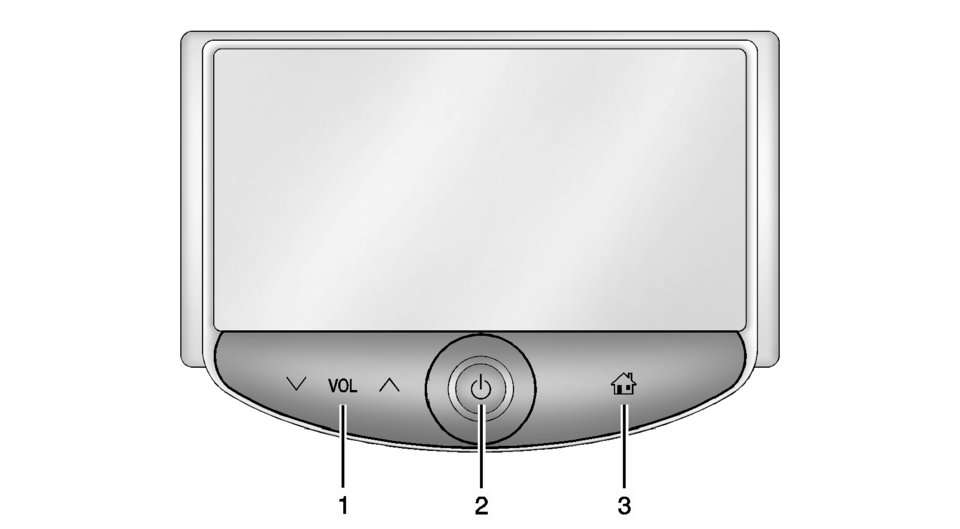
- z VOL y (Volume)
- Press to decrease or increase the volume.
- Press and hold to turn the power on or off.
- Press to go to the Home Page. See Home Page.
 Overview (Radio with CD/USB)
91011121314151617
O /VOL (Power/Volume)
Turns the system on or off and adjusts the volume.
Z (Eject)
Removes a disc from the CD slot.
Buttons 1−6
Radio: Saves a ...
 Radio Antenna Base Replacement
Radio Antenna Base Replacement
Callout
Component Name
Preliminary Procedure
Lower the rear of the headlining trim panel. Refer ...
Other materials:
Brake Fluid Level Indicator Switch Replacement
Removal Procedure
Disconnect the brake fluid level indicator switch
electrical connector.
Using a small, flat-bladed tool, lift the locking
tab on the underside of the brake fluid level indicator switch (1) and remove
the switch.
Inspect the maste ...
File menu
The file menu in the Nissan Armada driving recorder system allows users to conveniently
manage all recorded content, including photos and video files. Through this interface,
you can view, organize, and delete stored media directly from the touchscreen display,
making it easy to maintain stora ...
Starting the engine
Basic information
1. Apply the parking brake.
2. Confirm that the Nissan Armada is in the P (Park) position.
The Intelligent Key must be inside the Nissan Armada when operating the ignition
system.
3. Press the ignition switch to the ON position. Then depress the brake pedal
and press the ig ...

0.0054