
Chevrolet Sonic Owner's Manual: Parking/Turn Signal Lamp
1. Open the hood. See Hood.
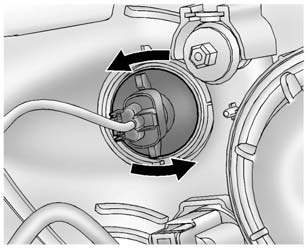
2. Remove the parking/turn signal lamp bulb socket from the headlamp assembly by turning counterclockwise.
3. Remove the bulb from the bulb socket by pulling it straight out.
4. Install the new bulb in the bulb socket.
5. Install the bulb socket into the headlamp assembly by turning clockwise.
 High-Beam Headlamp/ Low-Beam Headlamp
1. Open the hood. See Hood.
2. For the driver side bulb, remove the windshield washer bottle filler neck by
turning it one-quarter turn counterclockwise and pulling it straight up and out
of the ...
 Fog Lamps (LS, LT, and LTZ)
To replace the front fog lamp bulb:
1. Locate the fog lamp located under the front fascia.
2. Disconnect the electrical connector from the fog lamp bulb assembly.
3. Remove the bulb by turning it c ...
Other materials:
Rear Wiper/Washer System Description and Operation
The rear window wiper motor is located inside the hatchback door and is directly
connected to the rear window wiper. Ignition voltage is supplied to the rear wiper
motor through the wiper switch. The hatchback rear window washer systems equipped
with a separate washer fluid pump, hose, and noz ...
Engine Oil Cooler Pipe Replacement (LUW)
Engine Oil Cooler Pipe Replacement
Callout
Component Name
Preliminary Procedures
Drain the cooling system. Refer to Cooling System Draining and Filling.
Remove the exhaust manifold with catalytic converter. Refer to Exhaus ...
Spark Plug Replacement
Spark Plug Replacement
Callout
Component Name
Preliminary Procedure
Open the hood.
Remove the engine sight shield.
Remove the ignition coil. Refer to Ignition Coil Replacement.
1
Spark P ...

0.0087