
Chevrolet Sonic Owner's Manual: Passenger Airbag Status Indicator
The vehicle has a passenger sensing system. See Passenger Sensing System for important safety information. The instrument panel has a passenger airbag status indicator.
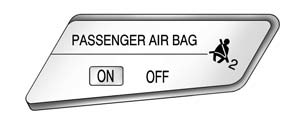
United States
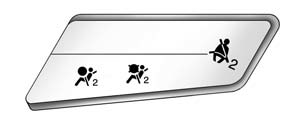
Canada
When the vehicle is started, the passenger airbag status indicator will light ON and OFF, or the symbol for on and off, for several seconds as a system check. Then, after several seconds, the status indicator will light either ON or OFF, or the on or off symbol to let you know the status of the front outboard passenger frontal airbag and knee airbag (if equipped).
If the word ON or the on symbol is lit on the passenger airbag status indicator, it means that the front outboard passenger frontal airbag and knee airbag (if equipped) are allowed to inflate.
If the word OFF or the off symbol is lit on the passenger airbag status indicator, it means that the passenger sensing system has turned off the front outboard passenger frontal airbag and knee airbag (if equipped).
If, after several seconds, both status indicator lights remain on, or if there are no lights at all, there may be a problem with the lights or the passenger sensing system. See your dealer for service.
Warning
If the airbag readiness light ever comes on and stays on, it means that something may be wrong with the airbag system. To help avoid injury to yourself or others, have the vehicle serviced right away. See Airbag Readiness Light for more information, including important safety information.
 Airbag Readiness Light
This light shows if there is an electrical problem with the airbag system. The
system check includes the airbag sensor(s), passenger sensing system, the pretensioners
(if equipped), the airbag mod ...
 Charging System Light
This light will come on briefly when the ignition is turned on, and the engine
is not running, as a check to show it is working.
It should go out when the engine is started. If it stays on, or co ...
Other materials:
Front Side Door Weatherstrip Replacement - Body Side
Front Side Door Weatherstrip Replacement - Body Side
Callout
Component Name
Preliminary Procedures
Remove the upper center pillar trim. Refer to Center Pillar Upper
Trim Panel Replacement.
Remove the lower center pillar t ...
Emergency Call (SOS) button
Emergency support
Basic information
In the Nissan Armada, NissanConnect Services provide a comprehensive range of
emergency assistance features designed to support both the driver and passengers
in critical situations.
For instance, in the event of illness, injury, or any emergency scenario, ...
Hands On Detection
Basic information
In the Nissan Armada, the Hands On Detection system is an essential safety feature
integrated within Steering Assist and ProPILOT Assist technologies. This system
continuously monitors the driver’s interaction with the steering wheel through built-in
sensors, ensuring that ...

0.0079