
Chevrolet Sonic Repair Manual: Passenger Compartment Air Filter Replacement (LHD)
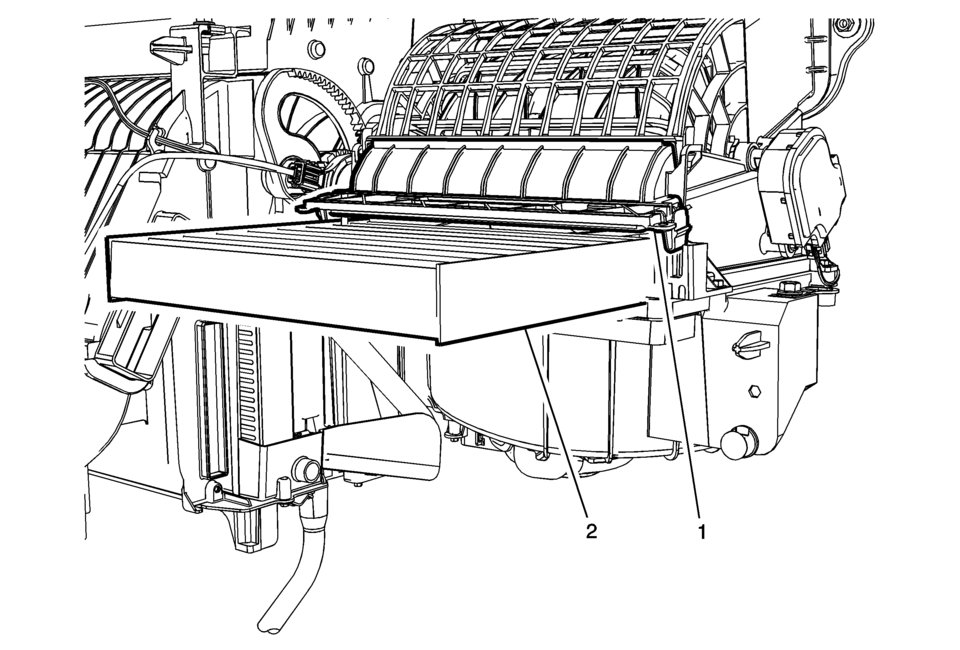
|
Callout |
Component Name |
|---|---|
|
Preliminary Procedure
Remove IP compartment. Refer to Instrument Panel Lower Compartment Replacement. |
|
|
1 |
Passenger Compartment Air Filter Service Lid Retainer Procedure
Release the retainer and open the service lid. |
|
2 |
Passenger Compartment Air Filter |
 Air Cleaner Element Replacement
Removal Procedure
Disconnect mass air flow sensor wiring harness plug (2) from mass air
flow sensor (3).
Unclip mass air flow sensor wiring harness retainer cl ...
 Forced Induction
...
Other materials:
SIR Identification Views
The SIR Identification Views shown below illustrate the approximate location
of all SIR components available for the vehicle. This will assist in determining
the appropriate SIR Disabling and Enabling for a given service procedure, refer
to SIR Disabling and Enabling.
Supplemental Inf ...
Rear Brake Caliper Bracket Replacement
Removal Procedure
Warning: Refer to Brake Dust Warning.
Raise and support the vehicle. Refer to Lifting and Jacking the Vehicle.
Remove the tire and wheel assembly. Refer to Tire and Wheel Removal
and Installation.
Note:
DO NOT use any ai ...
Fuel and Evaporative Emission Pipe Warning
Warning: In order to reduce the risk of fire and personal injury observe
the following items:
Replace all nylon fuel pipes that are nicked, scratched or damaged during
installation, do not attempt to repair the sections of the nylon fuel pipes
Do not hammer directly on the fu ...

0.0064