
Chevrolet Sonic Repair Manual: Radio and Telephone Control Switch Replacement
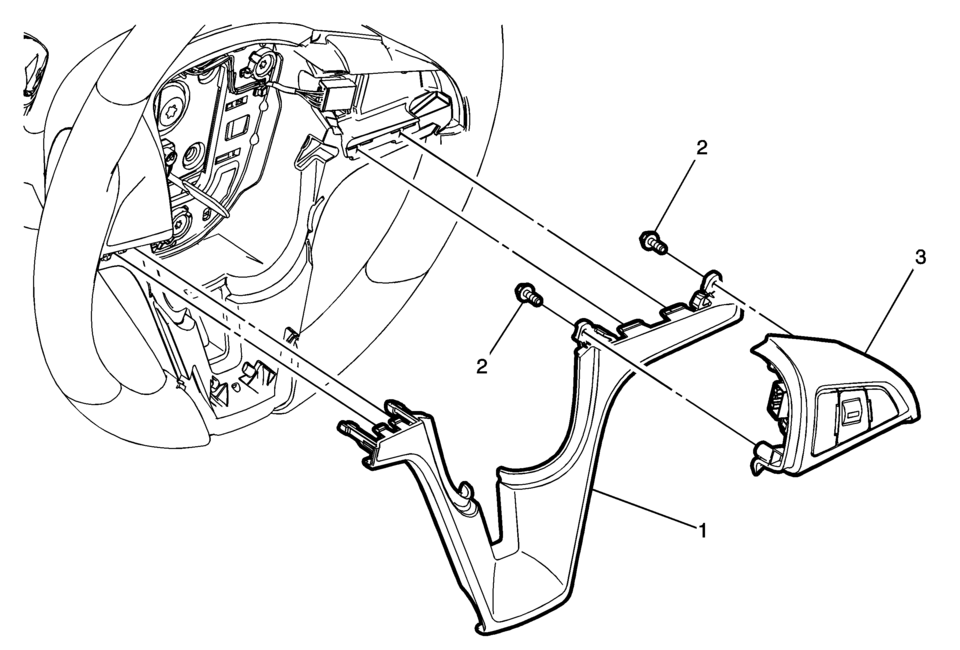
|
Callout |
Component Name |
|---|---|
|
Preliminary Procedure
Remove the sterring wheel inflatable restraint module. Refer to Airbag Steering Wheel Module Replacement. |
|
|
1 |
Steering Wheel Lower Cover |
|
2 |
Steering Wheel Lower Cover Fastener (Qty: 2) |
|
3 |
Radio and Telephone Control Switch Assembly Procedure
Disconnect the electrical connector. |
 Radio Windshield Side Garnish Molding Speaker Replacement
Radio Windshield Side Garnish Molding Speaker Replacement
Callout
Component Name
Preliminary Procedure
Remove the windshield si ...
 Radio/Audio System Description and Operation
The entertainment system on this vehicle may have several different configurations
available to it. To determine the specific configuration of the vehicle, please
see the Service Parts ID Label, a ...
Other materials:
Engine Oil and Oil Filter Replacement
Removal Procedure
Open hood.
Place a drain pan below the vehicle.
Caution: To prevent damage to oil filter cap ensure proper
tool is used. Do not use an open end wrench which may cause damage to
filter cap.
Using a 24mm socket or closed end wrench loosen ...
Inspection/Maintenance System Check
Diagnostic Instructions
Perform the Diagnostic System Check - Vehicle
prior to using this diagnostic procedure.
Review Diagnostic System Check - Vehicle
for an overview of the diagnostic approach.
Diagnostic Procedure Instructions provides
an overview of each diagn ...
Input Shaft Assemble
Special Tools
J-840733 Driver
For equivalent regional tools, refer to Special Tools.
Note: Ensure the input shaft rear bearing retaining ring (2) is
placed on the input shaft before installing the input shaft rear bearing
assembly (1).
Place the input sh ...

0.0066