
Chevrolet Sonic Repair Manual: Radio Rear Side Door Speaker Replacement
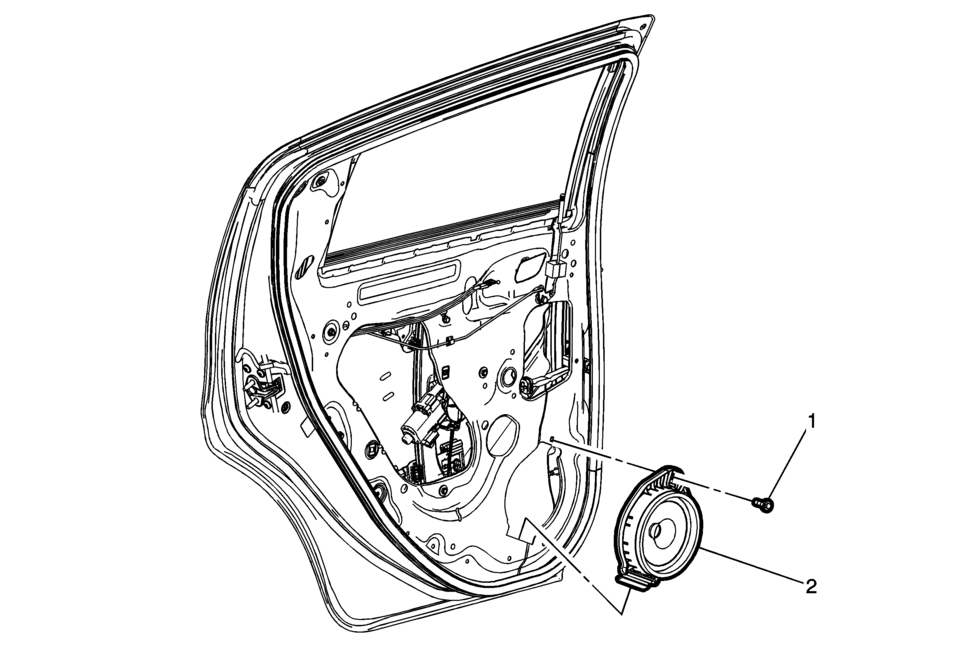
|
Callout |
Component Name |
|---|---|
|
Preliminary Procedure
Remove the rear side door trim. Refer to Rear Side Door Trim Replacement. |
|
|
1 |
Radio Rear Side Door Speaker Bolt Caution: Refer to Fastener Caution. |
|
2 |
Radio Rear Side Door Speaker Procedure
Disconnect the electrical connectors. |
 Radio Front Side Door Speaker Replacement
Radio Front Side Door Speaker Replacement
Callout
Component Name
Preliminary Procedure
Remove the front side door trim. Refer t ...
 Radio Replacement (With US8)
Radio Replacement
Callout
Component Name
Preliminary Procedure
Remove the instrument panel center molding. Refer to
Instrume ...
Other materials:
Airbag Readiness Light
This light shows if there is an electrical problem with the airbag system. The
system check includes the airbag sensor(s), passenger sensing system, the pretensioners
(if equipped), the airbag modules, the wiring, and the crash sensing and diagnostic
module. For more information on the airbag ...
Halogen Bulb Warning
Warning: Halogen bulbs contain gas under pressure. Handling a bulb
improperly could cause it to shatter into flying glass fragments. To help avoid
personal injury:
Turn off the lamp switch and allow the bulb to cool before changing
the bulb.
Leave the lamp switch OFF until th ...
Front Wheel Drive Intermediate Shaft Replacement
Front Wheel Drive Intermediate Shaft Replacement
Callout
Component Name
Preliminary Procedure
Raise and support the vehicle. Refer to Lifting and Jacking the
Vehicle.
Remove the wheel drive shaft assembly from the vehicle ...

0.0065