
Chevrolet Sonic Repair Manual: Radio Replacement (With US8)
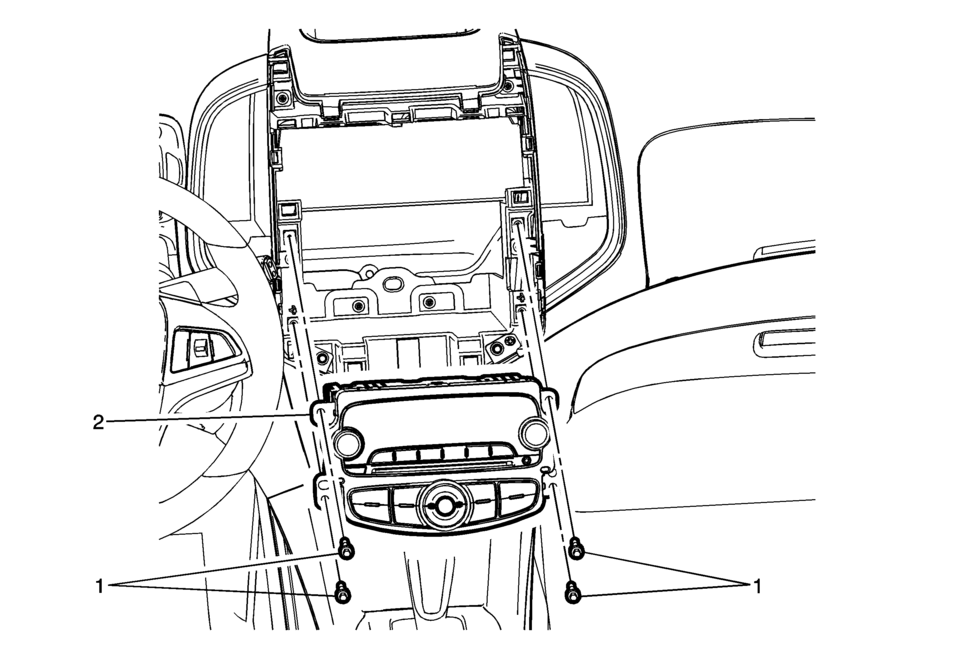
|
Callout |
Component Name |
|---|---|
|
Preliminary Procedure
Remove the instrument panel center molding. Refer to Instrument Panel Center Molding Replacement. |
|
|
1 |
Radio Bolts (Qty: 4) Caution: Refer to Fastener Caution. |
|
2 |
Radio Assembly Procedure
|
 Radio Rear Side Door Speaker Replacement
Radio Rear Side Door Speaker Replacement
Callout
Component Name
Preliminary Procedure
Remove the rear side door trim. Refer to ...
 Radio Replacement (Without US8)
Radio Replacement
Callout
Component Name
Preliminary Procedure
Remove the instrument panel center molding. Refer to
Instrume ...
Other materials:
SIR Service Precautions
General Service Instructions
Warning: When performing service on or near the SIR components
or the SIR wiring, the SIR system must be disabled. Refer to SIR Disabling
and Enabling . Failure to observe the correct procedure could cause deployment
of the SIR components, person ...
Steering Gear Boot Replacement
Special Tools
CH-804 Tensioner
For equivalent regional tools, refer to Special Tools.
Removal Procedure
Raise and support the vehicle. Refer to Lifting and Jacking the Vehicle.
Remove the steering linkage outer tie rod. Refer to Steering Linkage
Outer Tie Rod Rep ...
Transmission Fluid Pump, Front Differential Carrier Baffle, and Front Differential
Ring Gear Removal (6T30)
Transmission Fluid Pump, Front Differential Carrier Baffle, and Front
Differential Ring Gear Removal
Callout
Component Name
1
Front Differential Carrier Baffle Bolts M6 x 25 (Qty: 2)
...

0.005