
Chevrolet Sonic Owner's Manual: Reading Lamps
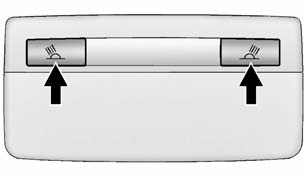
For vehicles with front reading lamps, they are in the overhead console.
 or
or
 (Reading Lamps): Press to turn each
lamp on or off.
 Dome Lamps
The dome lamp controls are in the headliner above the rear seats.
(Dome Lamp Override): Press to turn
the lamps off, even when a door is open.
(Door): When the button is returned
to the middl ...

Other materials:
Front Seat Armrest Replacement
Front Seat Armrest Replacement
Callout
Component Name
1
Front Seat Armrest Cover Zipper
Procedure
Open the zipper to access the front seat armrest mounting bolt and to
remove the armrest cover
...
Front Seat Heater Control Module Replacement
Front Seat Heater Control Module Replacement
Callout
Component Name
1
Front Seat Heater Control Module Fastener (Qty: 2)
Caution: Refer to Fastener Caution.
2
Front Seat He ...
Transmission Control Lever Boot Replacement
Transmission Control Lever Boot Replacement
Callout
Component Name
Preliminary Procedure
Remove the front floor console. Refer to Front
Floor Console Replacement.
1
Shift Control Lever Knob Cove ...

0.0052